Security Operations (Aegis)
One security posture across identity, endpoints, email, cloud, external footprint, network, AI agents, cryptography and people — built from every signal Versus already has. Detections group into cases, cases escalate to the Desk where AutoPilot investigates, and the score tells you honestly which domains are not monitored yet.
Versus already finds a lot: vulnerable device software and reachable exposure on the firewalls, posture problems and leaked credentials on laptops, unsanctioned AI use, unauthorized changes, path breaches, WAF violations, weak cryptography. Each lived on its own page with its own numbers. Security Operations pulls all of it into one detection fabric, groups it into cases per subject, scores the estate, and hands the cases that matter to the Desk, where AutoPilot runs the investigation.
Evidence and governance only in this phase. Every response verb is catalogued with its autonomy, but only the governance verbs (open a Desk ticket, notify a user) have executors today. Isolating an endpoint, disabling a user or quarantining mail arrive with their phases and run through the EDR, identity, mail and SaaS APIs, never from the Versus agent.
The score
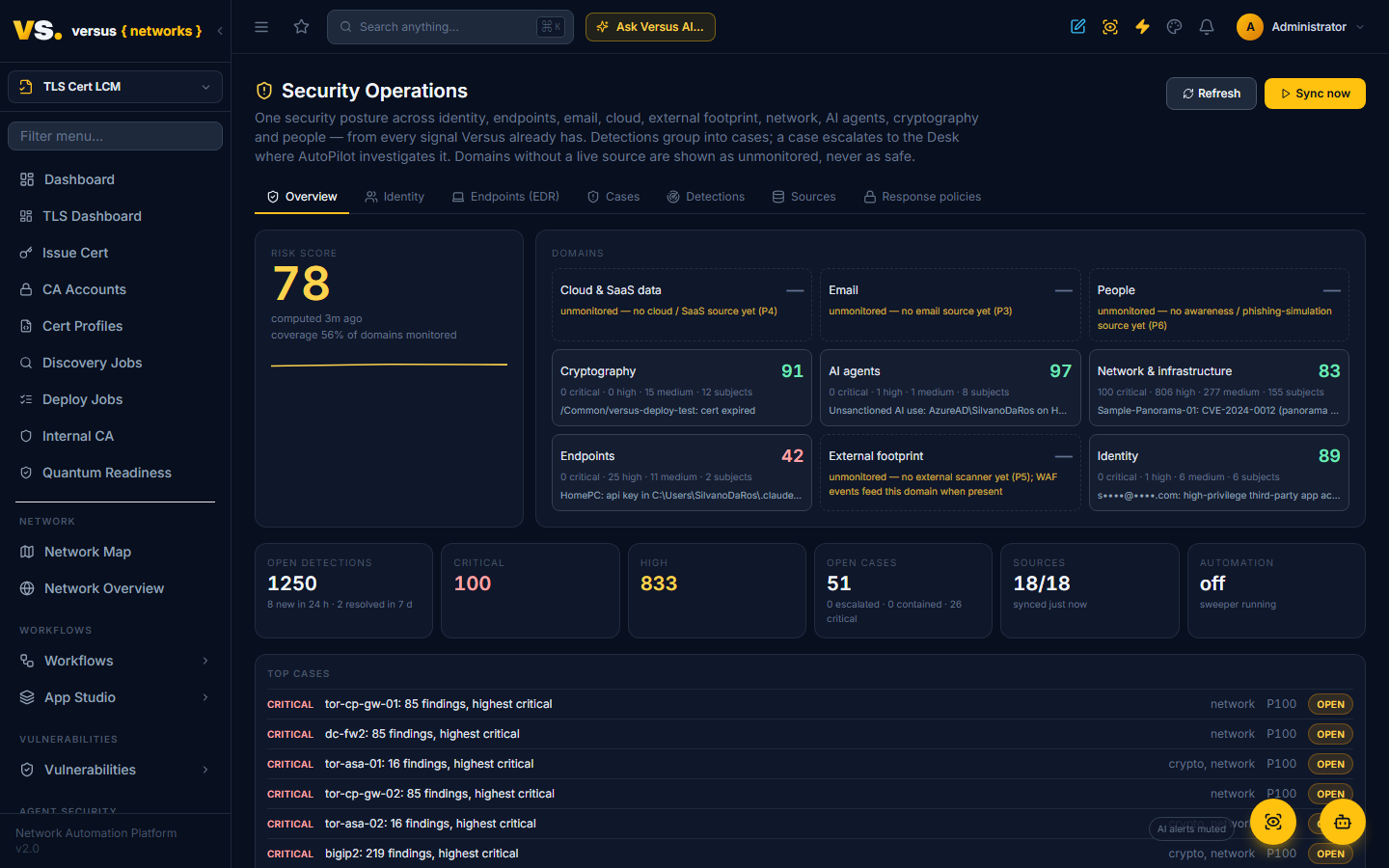
Security Operations → Overview shows the tenant risk score (0–100) and nine domains: identity, endpoints, email, cloud and SaaS data, external footprint, network and infrastructure, AI agents, cryptography, people.
Each domain is scored from its open detections, weighted by severity and confidence and normalised by how many subjects the domain has, so one bad laptop in a fleet of five hundred does not sink the number and one bad laptop in a fleet of two does. The tenant score is the weighted mean of the monitored domains only. A domain with no live source is shown as unmonitored with the reason (for example "no identity source yet"), and coverage says how many domains are monitored. The score never pretends an unmonitored domain is safe.
The 30-day trend, the change since the last computation, open detections by severity, open cases and source health sit beside it.
Detections
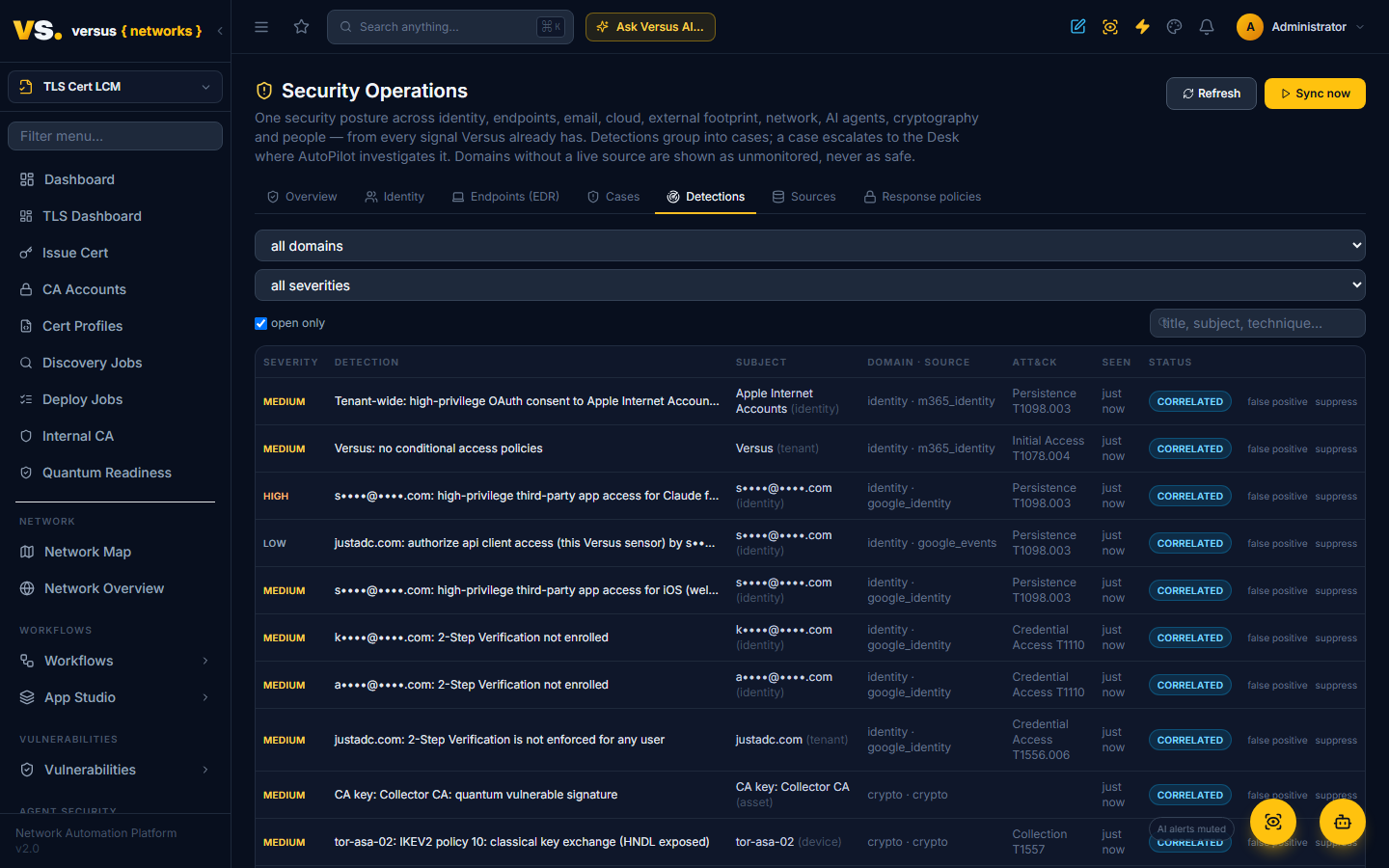
Every signal source produces normalised detections: a title, a severity and confidence, an ATT&CK tactic and technique where one applies, and the subject it is about (an endpoint, a device, an agent principal, a path monitor, a crypto asset). Sources in this phase:
| Domain | Sources |
|---|---|
| Endpoints | posture findings, vulnerable client software, certificate-store findings (user-installed roots, weak keys), secrets and SSH keys on disk, CrowdStrike Falcon detections from a tested connection |
| AI agents | shadow-AI candidates, high-risk agent principals, MCP client configurations holding inline credentials |
| Network | device vulnerabilities from the feeds and scanners (known-exploited ones are critical), firewall policy compliance violations, reachable exposure, unauthorized changes, path-monitor breaches |
| External footprint | WAF violations |
| Cryptography | quantum-vulnerable and weak cryptography with harvest-now-decrypt-later exposure |
| Identity | Microsoft 365 / Entra and Google Workspace: MFA or 2-Step Verification coverage, administrators, OAuth grants and third-party apps, inbox rules and Gmail forwarding, conditional access, risky sign-ins, admin changes, Alert Center |
| Endpoints (EDR) | Microsoft Defender for Endpoint / Business: machine health, risk, exposure, antivirus state, open alerts, unmanaged Versus endpoints |
Sources that enumerate current state resolve a detection automatically when the finding disappears (the vulnerability is patched, the key is removed). Event sources (breaches, WAF events, unauthorized changes) age out. An analyst can mark any detection a false positive or suppress it; that decision survives later syncs.
Identity (Microsoft 365 and Google Workspace)
Connect a Microsoft 365 tenant under Sources → Add Microsoft 365 with an Entra app registration that has read-only application permissions (the doc page lists them). The client secret is stored encrypted and never displayed again. Versus then reads, on its own schedule, the users and their sign-in activity, directory roles, MFA registration, conditional-access policies and security defaults, OAuth consents and the apps behind them, inbox rules in every mailbox, the last day of sign-ins, role changes in the audit log and, where Entra ID P2 is licensed, Identity Protection's risky users and risk detections. A licence a tenant does not have simply shows as a capability that is off; the rest still works.
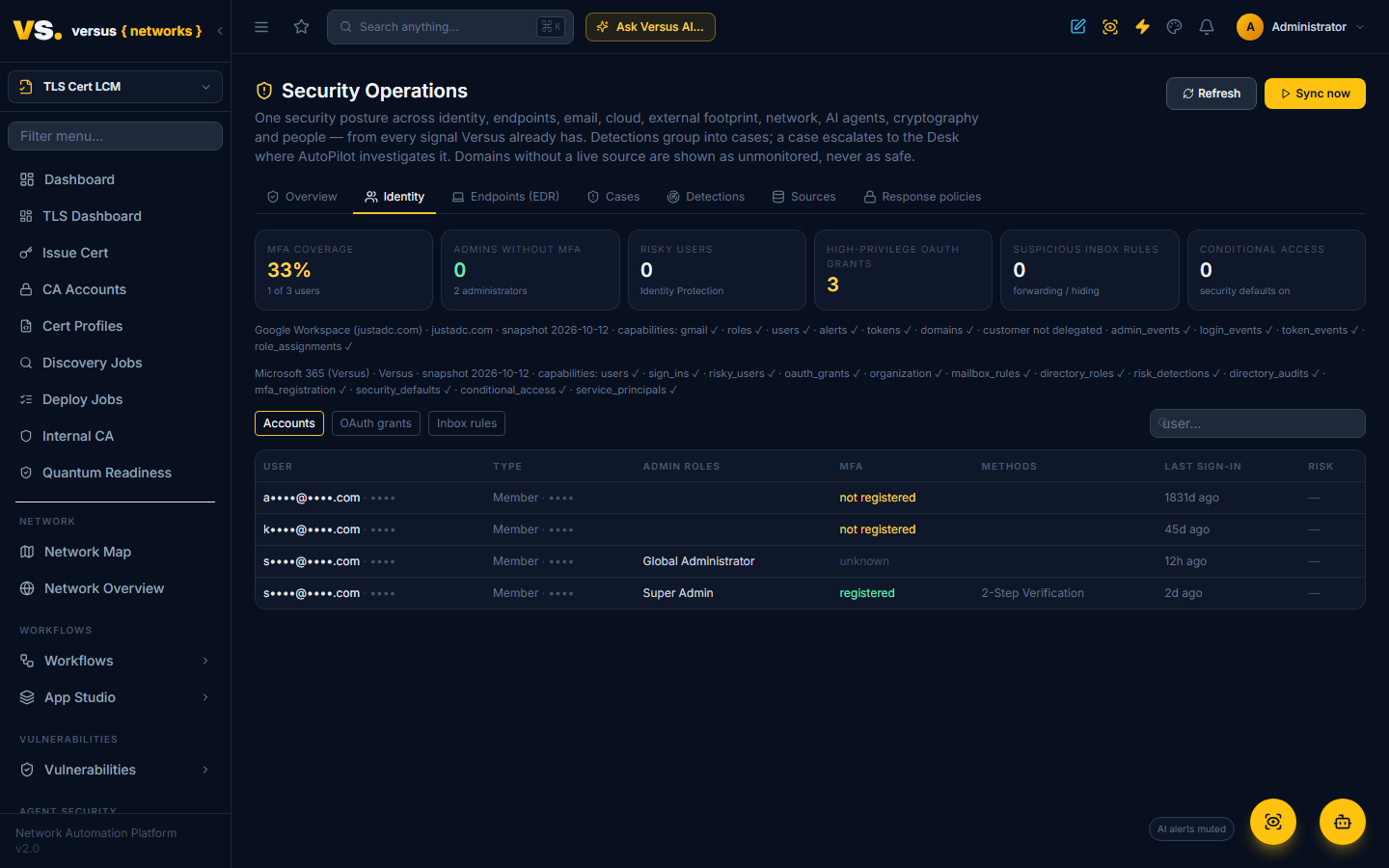
The Identity tab shows MFA coverage, administrators without MFA, risky users, high-privilege OAuth grants, suspicious inbox rules and the conditional-access posture, with the accounts, grants and rules behind them. Detections raised into the fabric: MFA not registered (high for administrators), dormant administrators, risky users, tenant-wide high-privilege consents to third-party apps, inbox rules that forward externally or hide mail, no conditional access with security defaults off, risky and legacy-authentication sign-ins, impossible travel, risk detections and role additions.
Google Workspace connects under Sources → Add Google Workspace with a service account that has domain-wide delegation: enable the Admin SDK, Alert Center and Gmail APIs in a Google Cloud project, create a service account and a JSON key, and authorise the service account's client ID in the Workspace Admin console (Security → API controls → Domain-wide delegation) for the read-only Admin SDK, Reports, Alert Center and Gmail-settings scopes listed in the form. The key file is read in the browser, stored encrypted and never displayed again; the form only echoes the service account's address. Each scope is requested on its own, so a scope left out of the delegation shows as a capability that is off rather than breaking the sync. Versus then reads the user directory with 2-Step Verification enrolment and enforcement, admin roles and role assignments, the third-party apps each user has authorised and their scopes, every mailbox's automatic forwarding, verified forwarding addresses and filters (impersonating that user, read-only), the login, admin and token audit logs, and the open Alert Center alerts.
Google detections raised into the fabric: 2-Step Verification not enrolled (high for administrators), 2-Step Verification not enforced for any user, dormant administrators, high-privilege third-party app access (well-known mail clients at medium), Gmail forwarding to external addresses, filters that hide mail, registered external forwarding addresses, suspicious and blocked sign-ins, government-backed attack warnings, 2-Step Verification disabled, bursts of failed sign-ins, admin role grants and other privilege changes, new app authorisations with high-privilege scopes, and every open Alert Center alert with Google's own severity. Microsoft 365 and Google Workspace accounts share one Identity tab; the provider is shown next to each account when both are connected.
Endpoints (Microsoft Defender)
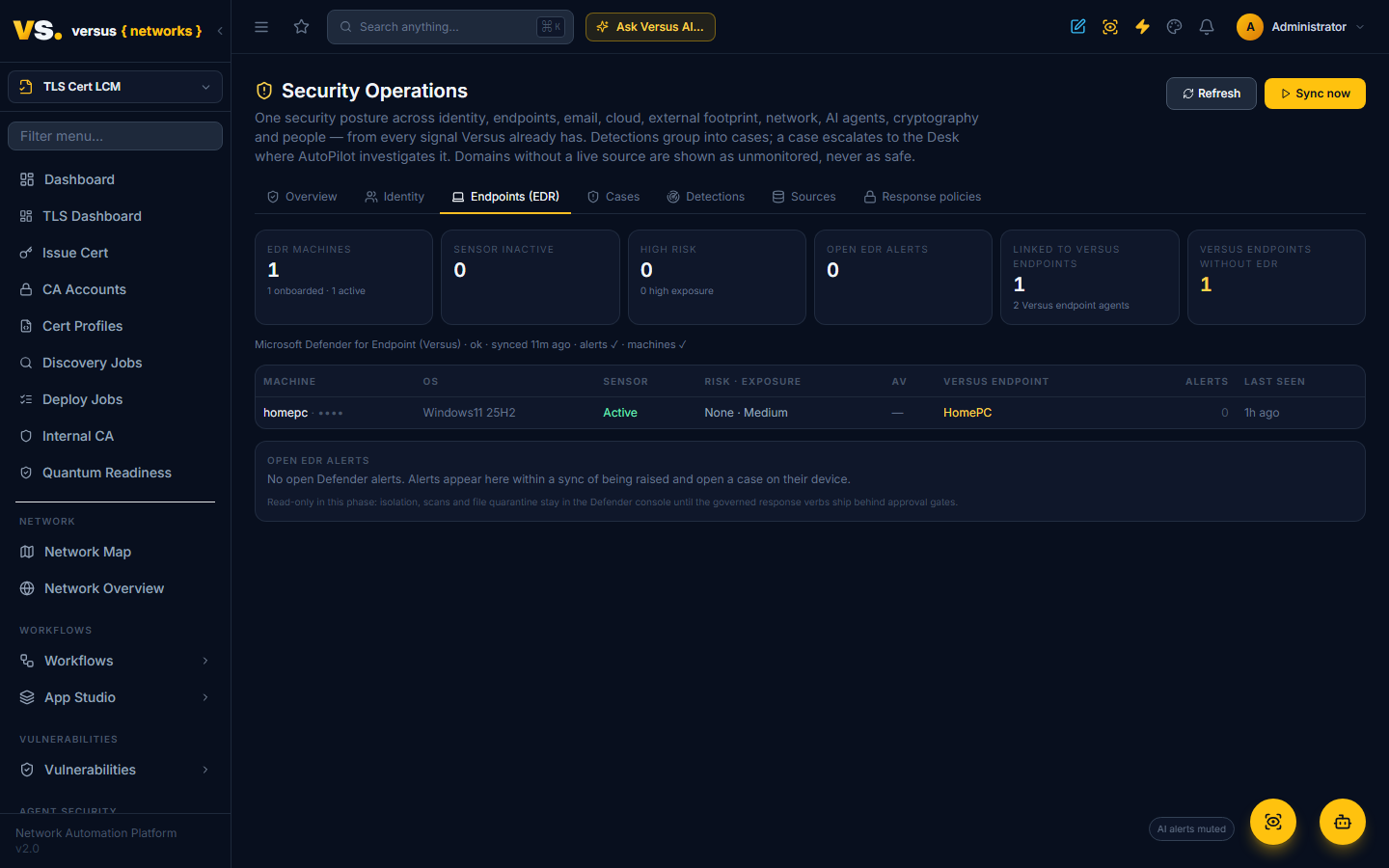
Once the Microsoft 365 tenant is connected, Add Microsoft Defender (same app) on the Sources tab reuses the same app registration (it needs the WindowsDefenderATP roles Machine.Read.All and Alert.Read.All) and reads Defender for Endpoint or Defender for Business: every onboarded machine with its sensor health, risk score, exposure level and antivirus state, and the open alerts with their category, technique and evidence. Machines are matched to the Versus endpoint agents by Entra device id or hostname, so a laptop that both agents know shows up once, with its posture, secrets, AI activity and EDR alerts on the same case.
Detections raised into the fabric: sensor inactive, device risk high, exposure high, Defender Antivirus not running or disabled, and no EDR agent for every Versus endpoint that Defender does not know about; each open Defender alert becomes an event on its device. Read-only in this phase: isolating a device, running a scan or quarantining a file stays in the Defender console until the governed response verbs ship behind approval gates. SentinelOne and CrowdStrike arrive in the same shape.
Cloud & SaaS data exposure (SharePoint, OneDrive, Google Drive)
Once a Microsoft 365 tenant or a Google Workspace is connected, Add Microsoft 365 data exposure and Add Google Workspace data exposure on the Sources tab reuse the same app — no new credentials, just a couple of read-only scopes. Microsoft needs the Graph application role Sites.Read.All; Google needs drive.metadata.readonly added to the service account's domain-wide delegation. Everything is read-only and metadata only: Versus reads how files are shared, never their contents.
The sensor walks SharePoint sites and OneDrive drives (bounded) and lists each Google Drive (impersonated, metadata only) for files shared beyond the organisation, and surfaces them on the Data exposure tab: anyone-with-the-link and public files, shares to outside addresses, and organisation- or domain-wide links, with the owner, the location, who it is shared with, and any sensitivity label. Detections raised into the fabric, all in the cloud domain so that score finally has a live source: a file shared with an anonymous "anyone" link (high), a file shared externally — high when the outside address is a personal mailbox, medium for another business — an organisation-wide link, and, for Microsoft 365, a tenant whose sharing policy still allows anonymous links. State detections resolve themselves the moment a file is locked back down.
Cases
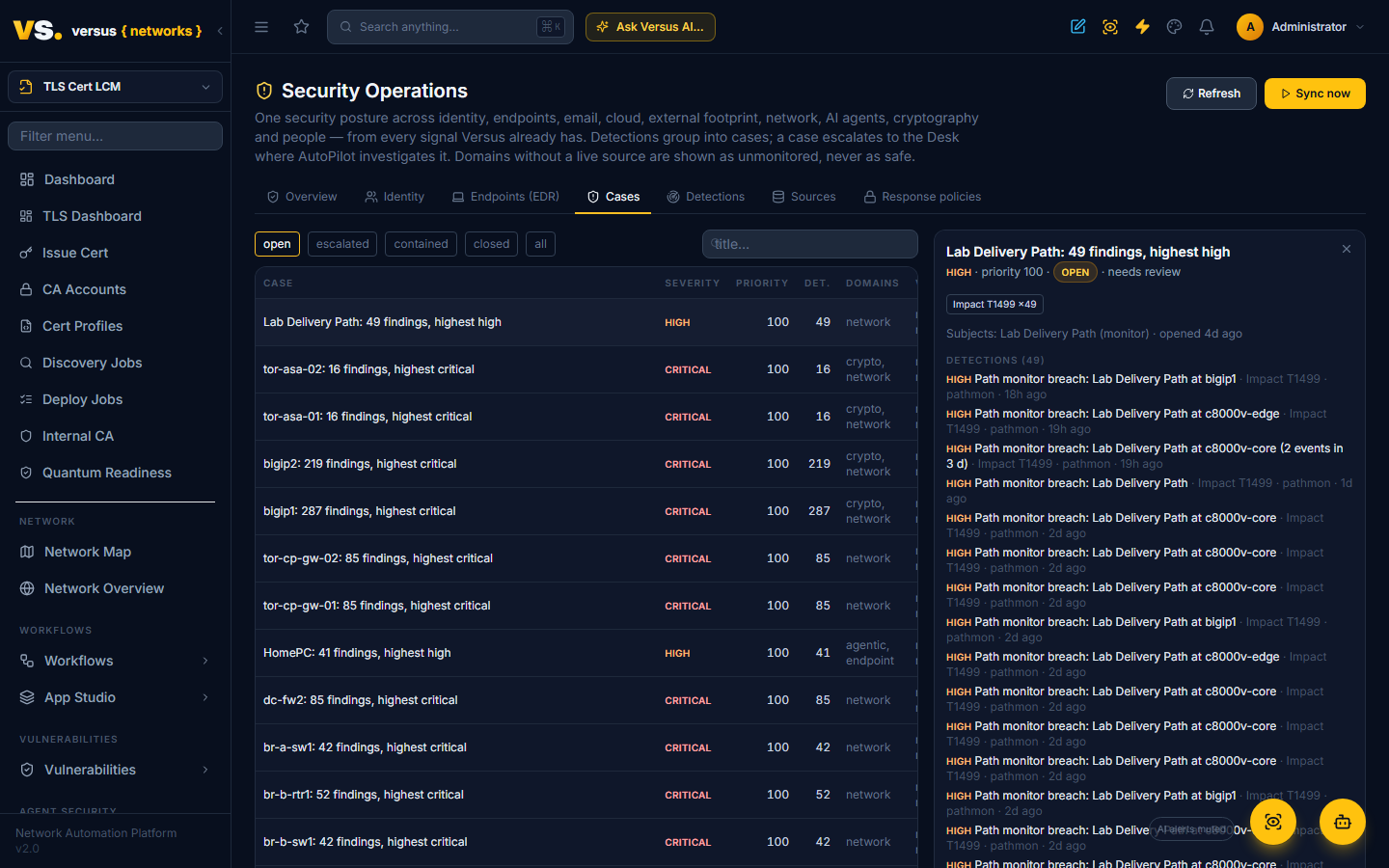
A subject with at least one medium-or-worse open detection gets a case: its detections, an ATT&CK chain in kill-chain order, a priority that rises with severity, confidence and multi-stage chains, and a state (open, escalated, contained, closed). Cases close themselves when every detection is resolved.
From a case:
- Escalate to Desk opens a Versus Desk incident carrying the evidence and the subject device as a configuration item. The AutoPilot feed picks it up and investigates under its own tolerance and budget, exactly as it does for any other incident.
- True positive / Benign records the verdict; benign closes the case and marks its detections false positives.
- Mark contained / Close track the response.
With Aegis automation enabled and the open_ticket policy set to automatic, new cases at or above the severity floor escalate on their own, bounded by a per-day budget so investigations, and the AI spend behind them, cannot run away.
Every action is written to a hash-chained ledger you can verify from the Policies tab, which doubles as change evidence for SOC 2.
Sources and policies
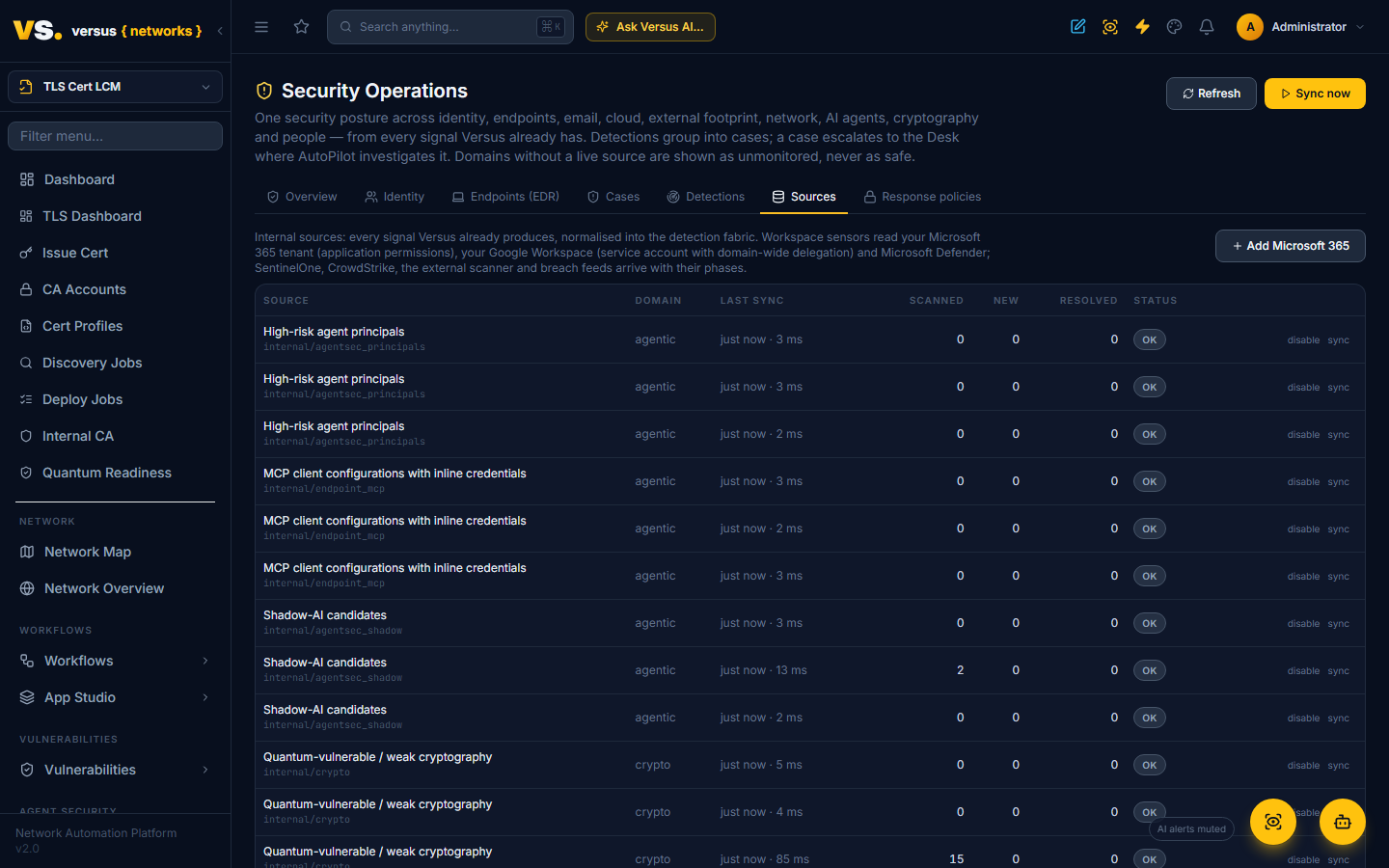
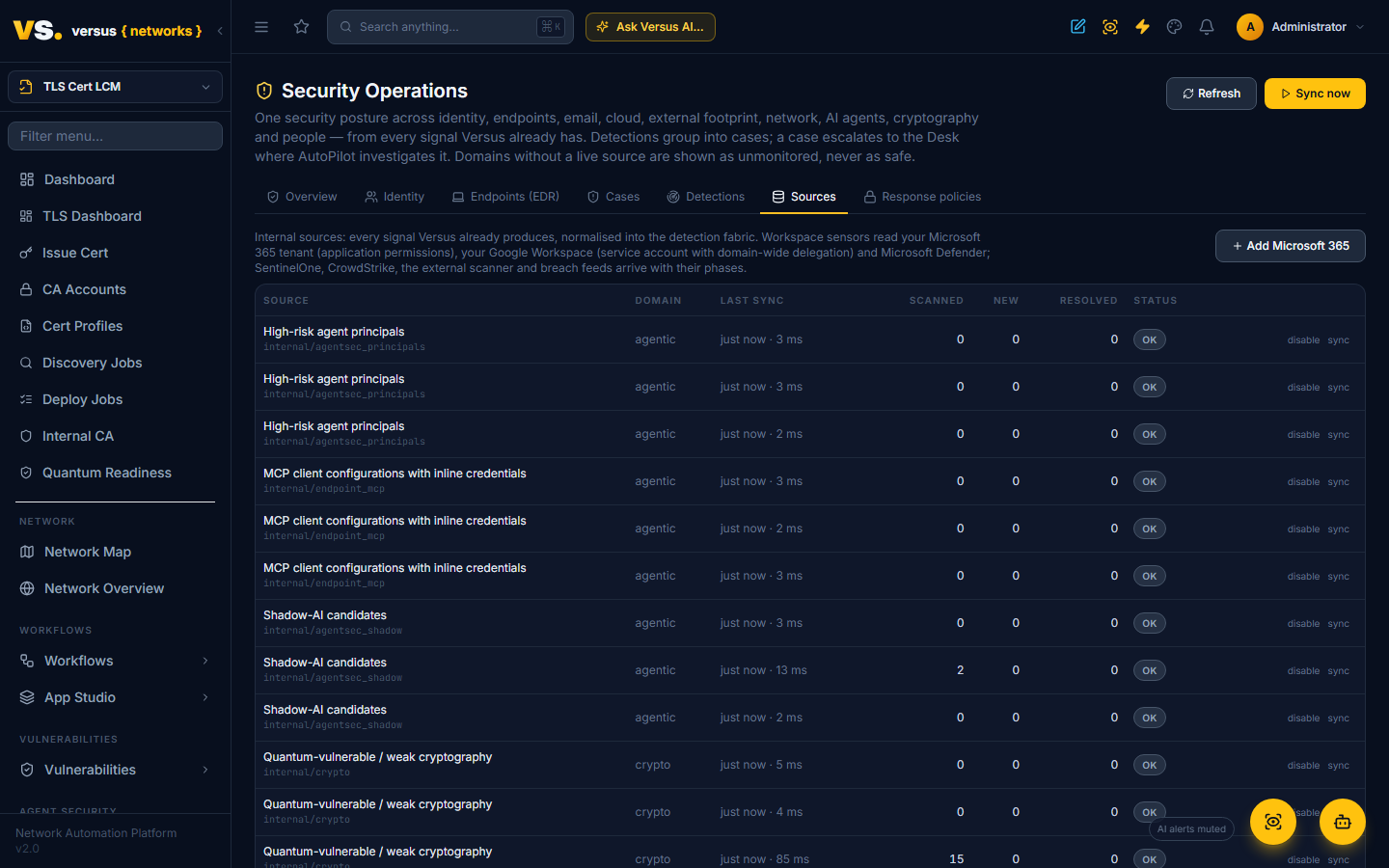
Sources lists every internal source with its last sync, how much it scanned and what it created or resolved; each can be disabled or synced by hand, and Sync now runs everything. The sweeper runs the same pass on a schedule when AEGIS_SWEEPER_ENABLED is set.
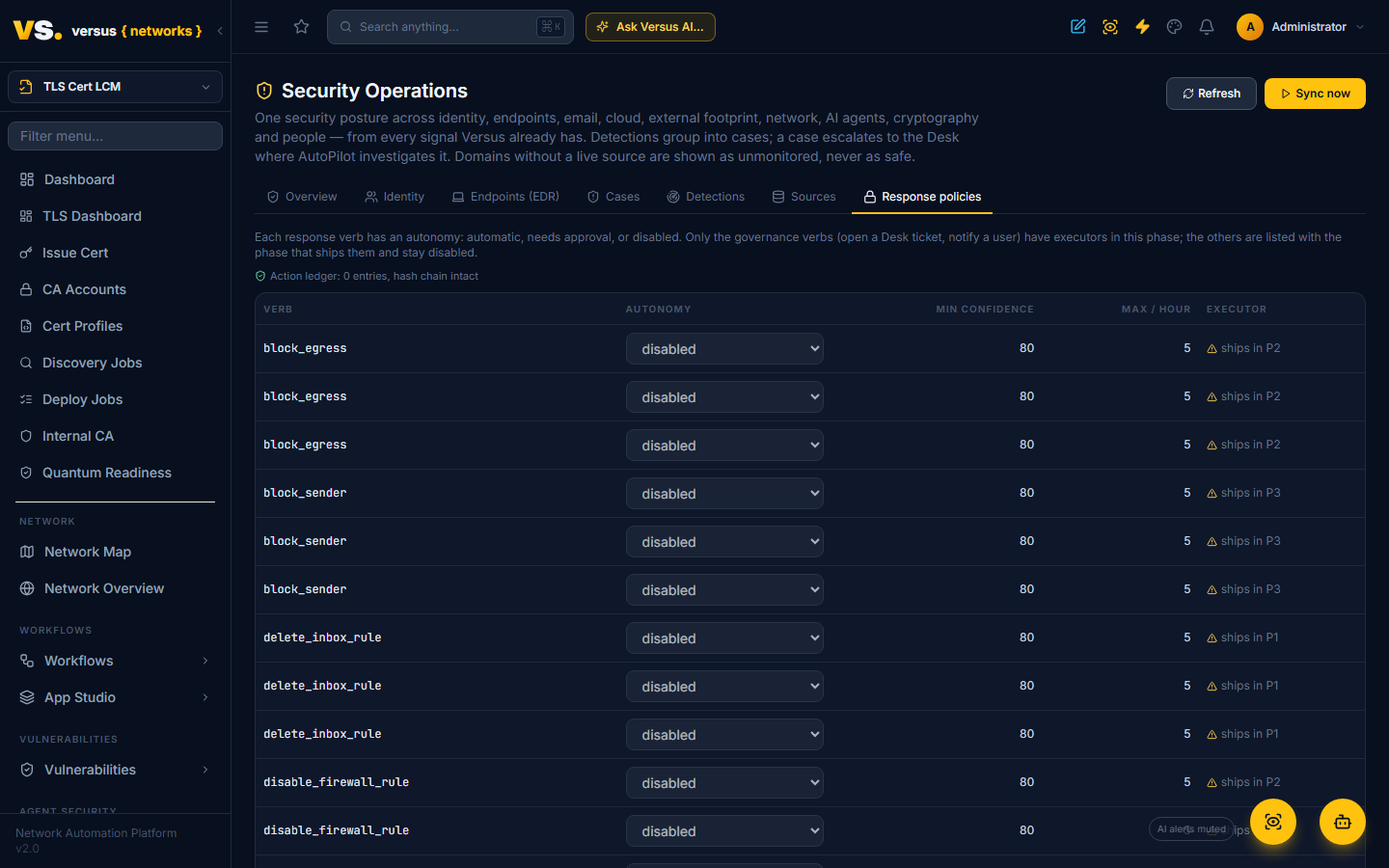
Response policies list the full verb catalogue (revoke sessions, disable user, quarantine mail, remove share, isolate endpoint, …) with an autonomy of automatic, needs approval or disabled, the confidence floor and a rate limit. Verbs whose executor has not shipped are shown with their phase and cannot be enabled.
Reports, assistant and your own agents
Generate client report on the Overview produces the client security report card (score, trend, one line per domain with its status and top finding, open cases); it is also available as Reports → Client Security Posture with CSV export. Over the Versus MCP server, read tokens get aegis_risk_score, aegis_cases and aegis_detections. In workflows, the aegis.open_case step records a detection on a device, endpoint or agent principal and can escalate it, so your own automation can raise a case.
What comes next
This is phases P0, P1 identity (Microsoft 365 and Google Workspace), the read-only Defender part of P2, and the file-sharing part of P4 (cloud & SaaS data protection) of the Versus Aegis roadmap towards a full managed-detection-and-response offering: SentinelOne and CrowdStrike in the same EDR shape, governed isolation through the EDR, email security, the rest of SaaS data protection, an external attack-surface scanner and breach feeds, awareness training and phishing simulation, the human SOC tier, an MSP console with white-label reporting, and cyber-insurance evidence.