Model Context Protocol (MCP)
How Versus speaks MCP in both directions — as an MCP server that exposes its governed, read-only estate tools to outside agents, and as an MCP client that lets the Versus AI and AI Agents call external MCP tool servers. Covers the endpoint, bearer tokens, tenant + RBAC scoping, the external-connection registry, the agent-as-a-tool provider, audit, and the security model.
The Model Context Protocol is an open, JSON-RPC 2.0 standard for connecting AI models to tools and data. Versus speaks it in both directions:
- Versus as an MCP server — Versus exposes its governed, read-only estate tools (devices, virtual servers, certificates, collectors, workflow runs, docs) so an outside MCP host (Claude Desktop, an IDE agent, another platform's assistant) can query your live infrastructure under a scoped, revocable token.
- Versus as an MCP client — the Versus AI assistant and AI Agents can call tools hosted on external MCP servers you register, so answers and investigations can reach systems Versus does not integrate with natively.
Both directions reuse the same tool engine, RBAC, and tenant isolation as the rest of the platform. Nothing new is trusted: an external tool result is treated as data, never as instructions.
Enable it — off by default. MCP is inert until you turn it on. An administrator flips it under System Settings → Model Context Protocol (MCP): one switch for Versus's own MCP server, one for outbound calls to external servers. Changes take effect immediately — no restart. With both off, the endpoint returns 404, the assistant sees no MCP tools, and an on-prem install is unaffected. Everything Versus serves today is read-only — there is no write path in the served catalog.
Versus as an MCP server
The endpoint
One Streamable-HTTP endpoint carries the protocol:
POST /api/mcp/
Authorization: Bearer <your MCP access token>
Content-Type: application/json
It accepts a single JSON-RPC request per POST (or a batch array) and answers the MCP methods initialize, ping, tools/list, and tools/call. A GET returns 405 — there is no server-initiated event stream in this phase. The response is a normal JSON body; a server that folds results into text/event-stream is also understood by the client.
Authentication — scoped bearer tokens
An MCP host authenticates with a Versus MCP access token: a hashed, scoped, revocable bearer bound to a tenant and an actor user. The token is shown once at creation and stored only as a SHA-256 hash — it cannot be recovered afterward.
POST /api/mcp/tokens/
{ "name": "Claude Desktop — read estate",
  "actor_user": 42,              // the user whose RBAC the token inherits; defaults to the creator
  "scope": "read",               // read | act (act is reserved)
  "allowed_tools": [],           // optional narrowing of the served catalog (empty = all read-only)
  "expires_at": null }

# → { "id": 3, "token_prefix": "vsmcp_Ab12", ..., "token": "vsmcp_…" }   ← the plaintext, shown once
Every call the token makes runs as its actor, inside that actor's tenant. Tool visibility and every row returned are exactly what that user would see in the product — no writes, no raw SQL, never a device secret. Revoke a token with POST /api/mcp/tokens/{id}/revoke/.
Troubleshooting: call the Versus Diagnostic agent
The headline use case is handing Versus a problem in plain language and getting a root cause back. The server exposes the investigate_issue tool, which starts a Diagnostic AutoPilot investigation — the same 15-expert war room behind the in-product diagnostics — scoped to the devices you name, and returns a link to the session it opens.
Submit a sample issue statement over MCP:
{"jsonrpc":"2.0","id":1,"method":"tools/call",
 "params":{"name":"investigate_issue","arguments":{
   "issue":"172.16.31.100 is unreachable — clients get 502s from lab.versus-demo.com",
   "devices":["c8000v-core","c8000v-edge","bigip1"]}}}
A full war-room run takes tens of seconds, so the call returns immediately with the session it started — the investigation runs while you watch it:
{"content":[{"type":"text","text":{
  "session_id": 94,
  "session_url": "/throughline/94",
  "status": "investigation started",
  "issue": "172.16.31.100 is unreachable — clients get 502s from lab.versus-demo.com",
  "devices": ["c8000v-core","c8000v-edge","bigip1"]
}}]}
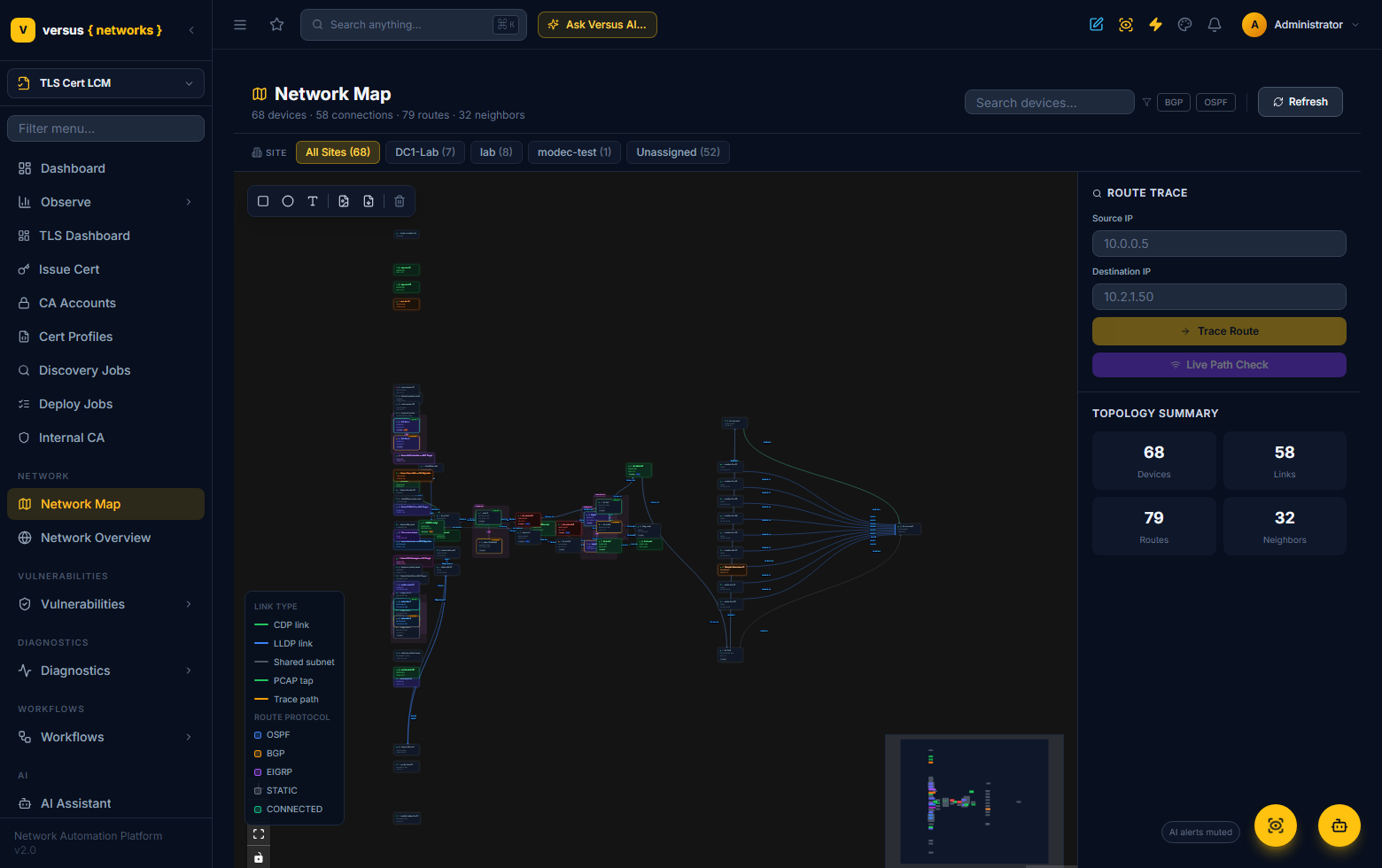
The devices you scope come from your live estate. In the lab, that estate is the Network Map the war room reasons over — you can also submit the same kind of issue here with Route Trace / Live Path Check:
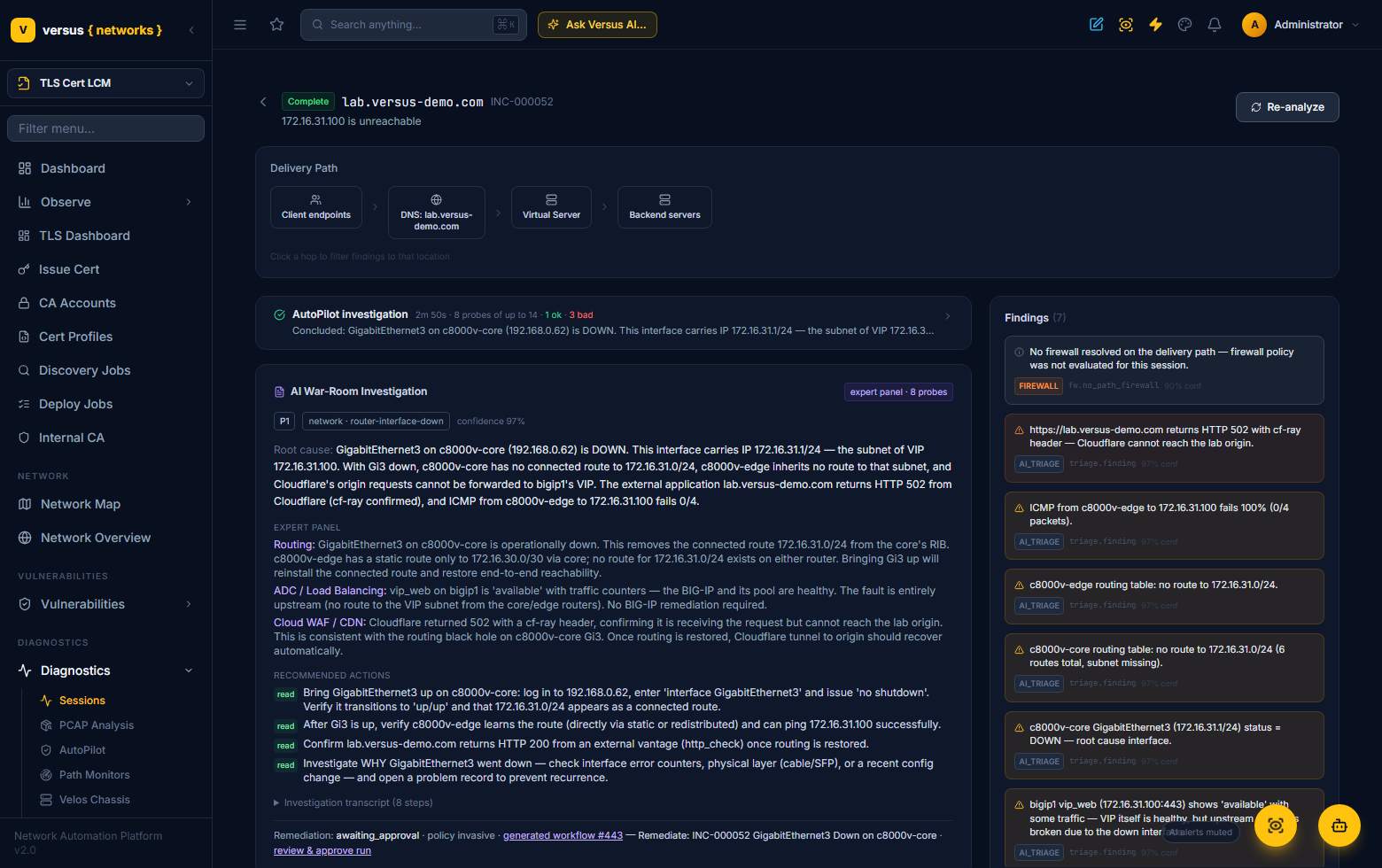
Opening session_url shows the triggered investigation: the AutoPilot war room's probes, a ranked root cause with a confidence score, the per-expert reasoning, the findings, and the recommended actions — and, where remediation is warranted, a generated workflow held for human approval:
investigate_issue appears in the served catalog whenever the diagnostic agent is enabled on the deployment. It is read-only: the war room only probes the estate; any remediation it proposes is a separate, explicitly human-approved workflow.
Read-only lookups
Alongside the diagnostic tool, the server exposes the same read-only lookups the in-product assistant uses — an estate summary, devices, virtual servers, offline and unreachable devices, collectors, expiring certificates, failed workflows, integration problems, and the product docs — each adapted into an MCP tool marked readOnlyHint. tools/list returns the catalog intersected with the token's allow-list; tools/call runs one and returns its result as MCP content. The user-emailing tool is deliberately not served — it has no meaning for an external actor.
Versus as an MCP client
Versus can also consume tools from MCP servers you run — an internal ops server, a vendor's MCP endpoint, a home-grown tool service.
Register an external server
POST /api/mcp/connections/
{ "name": "netops-tools",             // becomes the tool namespace: mcp__netops-tools__<tool>
  "transport": "http",
  "url": "https://mcp.internal.example.com/mcp",
  "auth_type": "bearer",              // none | bearer | header
  "auth_secret": "…",                 // write-only; never returned, never sent to a prompt
  "enabled": true,
  "auto_use": true,                   // offer these tools to the assistant automatically
  "allowed_tools": [] }               // optional subset of the server's advertised tools

# Discover + cache the server's catalog:
POST /api/mcp/connections/{id}/test/     # runs tools/list, caches it, sets status ok|error
To reach a server that lives inside a site (not on the public internet), bind the connection to a collector — the call rides the collector's authenticated tunnel rather than a direct route.
How external tools reach the AI
When the MCP client is enabled, every tool from an enabled, auto-use connection is offered to the Versus AI assistant under a namespaced name — mcp__<connection>__<tool> — alongside the built-in tools. When the model calls one, Versus routes it to the right server, enforces the connection's allow-list, records an audit row, and returns the result wrapped as untrusted data with an explicit instruction to the model never to follow directions embedded inside it.
External results are data, not instructions. A compromised or careless external server cannot steer the assistant: its output is fenced, size-capped, and labelled untrusted before it ever reaches the model.
MCP and Versus AI Agents
MCP fits the AI Agents feature two ways.
An external agent can be an MCP server. Under Workflows → AI Agents, add an agent with kind External and provider MCP server — agent as a tool. Point it at a registered connection (or a URL) and name the remote tool that is its entrypoint; the goal is passed as an argument. The workflow AI Agent step (core.agent) calls it like any other external agent — the call is logged, bounded, and the reply is treated as a proposal.
POST /api/agents/
{ "name": "Vendor Triage Agent", "kind": "external", "provider": "mcp",
  "config": { "connection": "netops-tools", "tool": "investigate", "goal_arg": "goal" } }
A native agent (and the assistant) can use MCP tools. With the client enabled, the tools from your registered servers are available to the tool-using engine, so an investigation can reach an external system mid-run — governed by the same allow-list, audit, and untrusted-result handling.
AutoPilot, both directions
The same pattern applies to Diagnostics AutoPilot:
- Serve — AutoPilot's read-only diagnostic tools can be exposed over the MCP server, so an external agent can query the estate or (in the reserved
actscope) start a governed investigation. - Consume — AutoPilot can call an external MCP tool during a war-room run, extending its reach without a native integration.
Audit
Every tool call in either direction is recorded — direction, tool name, actor, a SHA-256 digest of the arguments (never the raw arguments at rest), success, duration, and any error:
GET /api/mcp/calls/?direction=server      # inbound (tools Versus served)
GET /api/mcp/calls/?direction=client      # outbound (tools Versus called)
Security model
- Off by default. The server and the client each have their own flag. Nothing runs until an operator opts in.
- Read-only. The served catalog is read-only; there is no write path, raw SQL, or device secret in it. A write-capable catalog is a planned future phase and, if built, would route through Versus's existing approval governance — it does not exist today.
- Scoped tokens. A server token is hashed, revocable, tenant-bound, and acts as one user — tool visibility equals that user's RBAC.
- Tenant isolation. Every served call runs inside the token's tenant scope (row-level security); a token can never see another tenant's estate.
- Allow-lists both ways. A server token can be narrowed to a subset of tools; an external connection can be narrowed to a subset of the tools it advertises.
- Secrets are write-only. Connection credentials are set through the API and never returned or placed in a prompt.
- External output is untrusted. Results from external MCP servers are fenced, capped, and labelled so the model treats them as data.
Use cases
- Bring Versus into your AI workspace — query the live estate from Claude Desktop, an IDE agent, or another assistant, under a scoped read-only token.
- Extend the Versus AI — let the assistant reach an internal tool server (a CMDB, a ticketing bridge, a bespoke automation) it has no native integration for.
- Compose agents — call an outside agent as a tool from a workflow, or let a Versus agent call outside tools mid-investigation, all governed and audited.
- Reach site-local tools — front an in-site MCP server through a collector tunnel instead of exposing it publicly.
Related: Calling a Versus AI Agent · Diagnostics AutoPilot · Collector Control Plane