Microsoft Teams — AI Agents in a Channel
Connect a Teams channel to Versus and any registered AI agent — native agents, external agents, or the built-in AutoPilot — becomes usable from the channel. People @mention the agent with a question; Versus runs it and posts the findings back as an Adaptive Card.
@Versus help
@Versus agents
@Versus activation-verifier is vip_web healthy? on bigip1
@Versus Change Risk Assessor: assess CHG-1042 on core-fw-01, core-fw-02
Versus acknowledges the command immediately, runs the agent in the background (the same governed engine the workflow AI Agent step and the API use), and posts the findings to the channel: root cause, severity, confidence, key findings, recommended actions, and a link to the full investigation in Versus. The same channel also receives findings posted from a workflow, from an App Builder AI Agent widget, and from workflow scripts via versus.integrations.teams().
Set-up
Configured under Integrations → Microsoft Teams (administrator). One Teams channel record per channel you want to wire.
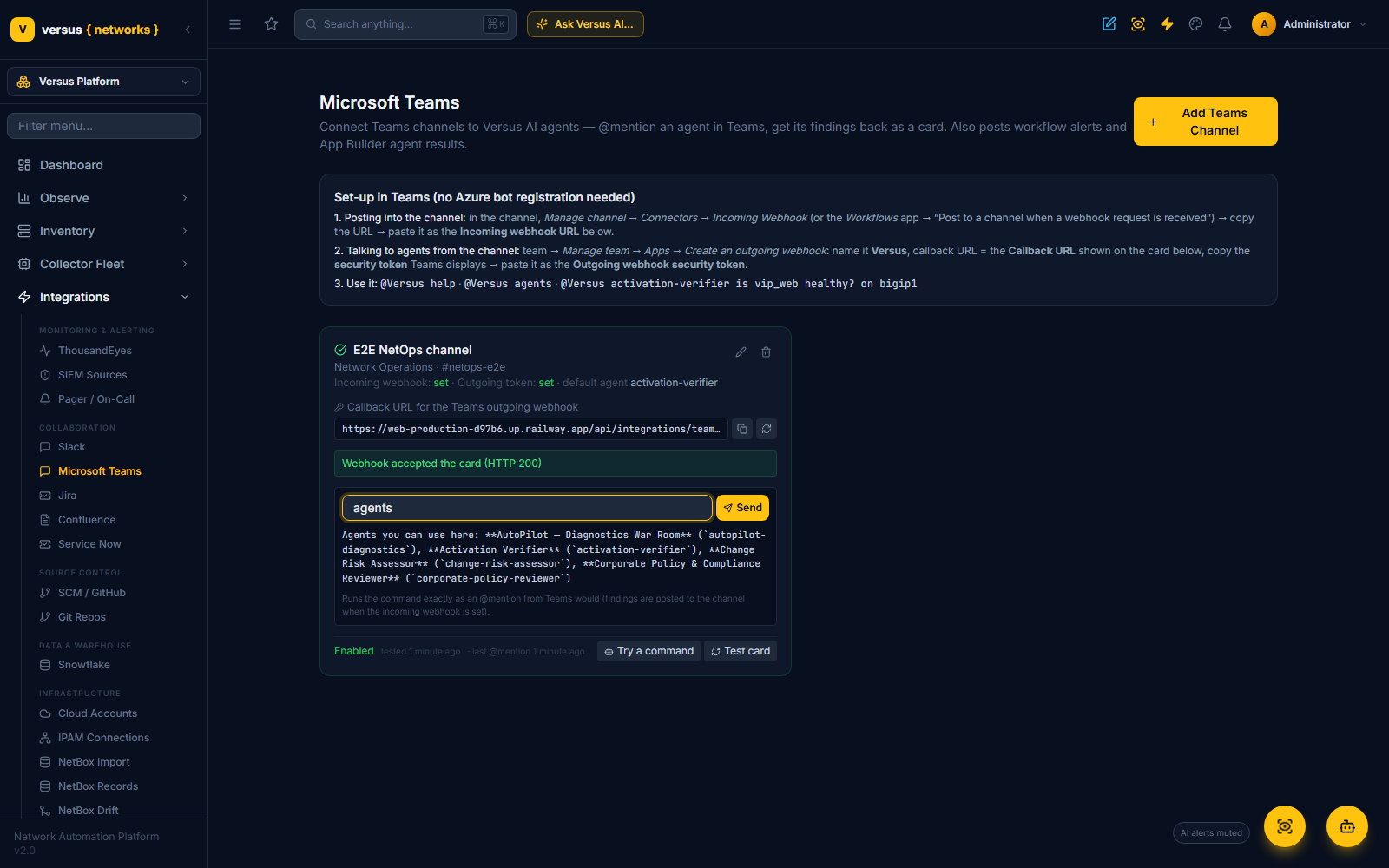
1 · Posting into the channel (Versus → Teams)
In the channel: Manage channel → Connectors → Incoming Webhook → name it Versus → copy the URL. If your tenant has retired Office 365 connectors, use the Workflows app instead: Post to a channel when a webhook request is received → copy the URL it gives you. Both accept the Adaptive Cards Versus sends. Paste it as the Incoming webhook URL, then click Test card — a green card appears in Teams.
2 · Talking to agents from the channel (Teams → Versus)
In the team: Manage team → Apps → Create an outgoing webhook:
- Name:
Versus— this is what people @mention. - Callback URL: the Callback URL shown on the channel record in Versus (
https://<versus-host>/api/integrations/teams/inbound/<key>/). - Teams then shows a security token — paste it as the Outgoing webhook security token.
The token is what authenticates Teams to Versus: every message Teams sends is HMAC-SHA256 signed with it, and Versus refuses anything that does not verify. The callback key is unguessable and can be rotated from the record at any time.
3 · Choose the agents
- Default agent — used when a message does not name one (
@Versus is vip_web healthy?). - Agents allowed from this channel — leave empty for every enabled agent, or restrict a channel to specific ones (a #security channel might only get the Policy Reviewer).
Use Try a command on the record to run any command exactly as an @mention would, before the Teams side is wired.
Commands
| Say | What happens |
|---|---|
@Versus help | Usage and the agents available in this channel |
@Versus agents | Lists the agents (as a card when the incoming webhook is set) |
@Versus <agent> <what to check> | Runs that agent. <agent> is the slug or the display name (activation-verifier, Activation Verifier); an optional : may follow it |
… on <device1, device2> | Scopes the run to those devices (names, hostnames or ids); unknown names are ignored and reported in the acknowledgement |
@Versus <what to check> | Uses the channel's default agent |
The acknowledgement names the agent, the goal, the devices and the run link. Findings arrive as a card a minute or three later. If the channel has no incoming webhook, the findings are only visible in Versus (the acknowledgement says so).
What comes back
- Headline — the root cause (or the summary for an external agent).
- Facts — who asked, devices, severity (P1–P4), domain, confidence, number of probes.
- Key findings, Recommended actions, How to verify.
- Open in Versus — the AnalysisSession with the full live investigation log.
A failed run posts an error card rather than silence.
Governance
- The agent is one you registered under Workflows → AI Agents; Teams users cannot define agents, only invoke them.
- Native agents run on the read-only diagnostic toolbox with their own tool allow-list and step budget. Nothing in this path can change a device.
- Every message is HMAC-verified; the callback key is per channel and rotatable; a channel is capped at 30 runs per hour.
- Every run is an
AnalysisSession(origin teams, with the requester's Teams display name) under Diagnostics → Sessions, tenant-scoped like everything else. - The whole feature follows the
AGENT_TASKS_ENABLEDflag — off means the channel replies that agents are disabled.
Posting to Teams from elsewhere
Workflow AI Agent step — set Post findings to Microsoft Teams to the channel record's name and the card is posted when the step finishes (native and external agents alike). App Builder AI Agent widget — set Also post findings to Microsoft Teams to the channel name; users get the result in the app and the NOC sees it in Teams. Workflow scripts:
teams = versus.integrations.teams()                     # first enabled channel, or teams('NetOps war room')
teams.message('Snapshot complete for VS vs_prod_01')
teams.alert('BGP peer down on core-rtr-01', severity='critical', title='Routing')
teams.card('Change CHG-1042', text='Deployed to 3 firewalls', facts={'Result': 'success'}, url=run_url)
teams.agent_result(findings, agent_name='Activation Verifier', goal='Is vip_web healthy?')
API
GET/POST  /api/integrations/teams-sources/                        channel records (secrets write-only)
POST      /api/integrations/teams-sources/{id}/test_connection/
POST      /api/integrations/teams-sources/{id}/simulate/           { "text": "activation-verifier is vip_web healthy?" } → { reply }
POST      /api/integrations/teams-sources/{id}/rotate_inbound_key/
GET       /api/integrations/teams-sources/agents/                  agents a channel can use
POST      /api/integrations/teams/inbound/{key}/                   the Teams Outgoing Webhook callback (HMAC-signed)
Troubleshooting
| Symptom | Cause |
|---|---|
| Teams shows "Signature check failed" | The security token in Versus does not match the outgoing webhook — re-copy it from Teams |
| "Unknown or disabled Versus Teams connection" | The callback URL is stale (key rotated) or the record is disabled |
| Acknowledged, but no findings card | No incoming webhook on the record, or the webhook URL was revoked — click Test card |
| "reached 30 agent runs in the last hour" | Per-channel rate limit — wait, or split traffic across channels |
| "AI agents are disabled on this Versus deployment" | AGENT_TASKS_ENABLED is off |
Related: Calling a Versus AI Agent · App Builder Overview