Calling a Versus AI Agent
Versus has two kinds of AI agent, and either can be invoked from another system over the REST API: a workflow AI Agent — a governed, tool-using actor that investigates live infrastructure and returns structured findings — and a Knowledge Assistant — a grounded assistant that answers a question from your wiki with citations. This guide covers both.
Which agent do I want?
| Workflow AI Agent | Knowledge Assistant | |
|---|---|---|
| Purpose | Run a task: investigate infra, score a change, verify health | Answer a question from your Knowledge Base |
| Grounded in | Live estate via read-only device tools | In-scope wiki pages (RAG), permission-filtered |
| Returns | Structured findings (root cause, key findings, recommended actions) | A cited answer + confidence |
| Where it lives | Workflows → AI Agents (and the core.agent step) | Wiki → Knowledge Assistants |
| API base | /api/agents/ | /api/kb/agents/ |
Authentication
Every call needs a bearer token — the same JWT the Versus SPA uses. Obtain one for a user or a service account, then send it on each request:
Authorization: Bearer <ACCESS_TOKEN>
Content-Type: application/json1 · Workflow AI Agents
These are the tool-using actors you register under Workflows → AI Agents.
List the registered agents
The list includes your tenant's agents plus the read-only built-in AutoPilot diagnostic agent.
GET /api/agents/

# → [
#   { "id": "builtin:autopilot", "slug": "autopilot-diagnostics",
#     "name": "AutoPilot — Diagnostics War Room", "read_only": true, ... },
#   { "id": 1, "slug": "change-risk-assessor", "name": "Change Risk Assessor",
#     "allowed_tools": ["get_device_info","get_routes", ...], "max_steps": 8, ... },
#   ...
# ]
Invoke an agent (the main call)
POST /api/agents/{id}/run/ hands the agent a goal and, optionally, the devices it may probe. It runs the agent's observe → tool → decide loop synchronously and returns the structured findings. Use the agent's numeric id (or builtin:autopilot for the built-in AutoPilot).
POST /api/agents/1/run/
{
  "goal": "Assess the risk of publishing a new HTTPS VIP on bigip1 fronted by palo-2.",
  "devices": ["bigip1", "palo-2"]          // ids or names; optional
}

# → {
#   "agent": "change-risk-assessor",
#   "goal": "...",
#   "devices": ["bigip1", "palo-2"],
#   "findings": {
#     "classification": { "domain": "adc", "severity": "P3" },
#     "root_cause": "No VIP/IP conflict; path client→VIP→pool reachable through palo-2.",
#     "confidence": 0.82,
#     "key_findings": ["...", "..."],
#     "recommended_actions": [ { "action": "...", "invasive": false } ],
#     "transcript": [ /* the probe-by-probe trace */ ]
#   }
# }max_steps; a run typically takes tens of seconds. Keep max_steps modest for API callers so it finishes inside the request window.Invoke the built-in AutoPilot
The platform's 15-expert diagnostic war room is callable the same way — point it at a symptom:
POST /api/agents/builtin:autopilot/run/
{ "goal": "The checkout service is intermittently timing out — find the root cause.",
  "devices": ["palo-2", "bigip1", "diag-web"] }
Create an agent
POST /api/agents/
{
  "name": "Firewall Change Reviewer",
  "system_prompt": "You review proposed firewall changes for risk and compliance...",
  "allowed_tools": ["firewall_policy", "get_routes", "check_port", "python_probe"],
  "max_steps": 8,
  "autonomy": "propose_approve"
}

# GET /api/agents/tools/   → the read-only tool catalog you can allow-list against
Trigger a workflow that uses agents
To run a whole governed process (agents + human approvals + automation) rather than a single agent, trigger a workflow. The agents run as core.agent steps inside it:
POST /api/workflow-trigger/
{ "workflow": "governed-service-activation",   // slug or id
  "device_group": "prod-edge",                 // required — the device group the run is scoped to
  "context": { "request": "Publish the Instant Payments API service" } }
2 · Knowledge Assistants
These are the grounded wiki assistants you author under Wiki → Knowledge Assistants. They answer only from their in-scope Knowledge Base, filtered by the asking user's page permissions, and cite every claim. Address one by its key.
Ask a question
POST /api/kb/agents/netops-helpdesk/ask/
{ "question": "How do we fail over the FIN-LB005 NetScaler pair?" }

# → {
#   "answer": "Drain the primary, verify sync, then force failover... [1][2]",
#   "citations": [ { "n": 1, "page_id": "...", "title": "NetScaler HA runbook", "url": "..." },
#                  { "n": 2, "title": "...", "url": "..." } ],
#   "confidence": 0.74
# }
Multi-turn chat and the confirmed, allow-listed actions use the same base:
POST /api/kb/agents/{key}/chat/   { "messages": [ {"role":"user","content":"..."} ], "thread_id": "..." }
POST /api/kb/agents/{key}/act/    { "action": "launch_runbook", "params": { ... } }     // only allow-listed actions:
                                                                                       // launch_runbook · create_issue · link_issue
// summarise_device · summarise_report3 · From Microsoft Teams
Wire a Teams channel under Integrations → Microsoft Teams (an incoming webhook for posting, an outgoing webhook so people can @mention Versus) and every agent in the registry can be run from the channel — no Azure bot registration:
@Versus agents
@Versus activation-verifier is vip_web healthy? on bigip1
@Versus Change Risk Assessor: assess CHG-1042 on core-fw-01, core-fw-02
Versus acknowledges at once, runs the agent in the background and posts the findings card (root cause, severity, confidence, key findings, recommended actions, link to the session) back into the channel. A workflow's core.agent step and an App Builder AI Agent widget can post their findings to the same channel. Set-up, commands and governance: Microsoft Teams — AI Agents in a Channel.
4 · Inside an App Builder app
The Page Designer has an AI Agent widget (palette group AI). Drop it on a page, pick a registered agent, and the published app shows an "ask the agent" panel: suggested questions, a free-text goal, optionally a choice of devices from the app's entitlements, the live investigation steps as they happen, and the structured findings. The agent is fixed by the page — app users choose what to ask, never which agent or which tools — and every run is an AnalysisSession (origin app_builder) an admin can open.
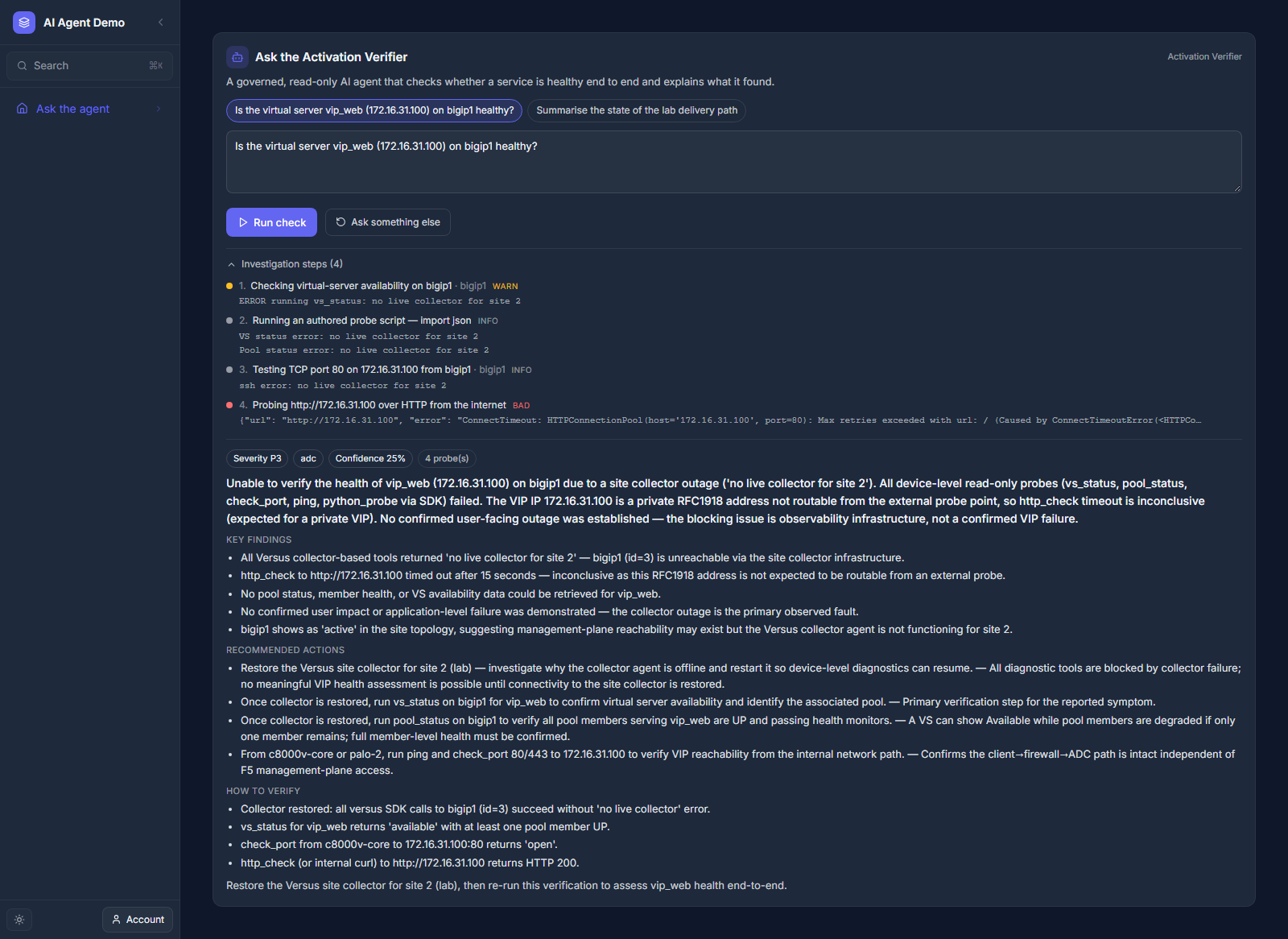
Widget options: agent, title and intro, suggested questions, device mode (none, a fixed list, or entitled — the user picks from the app's device entitlements), whether to show the live steps, and an optional Teams channel to post findings to. Publishing refuses a page whose agent is missing or disabled. See App Builder Overview → AI Agent widget.
Governance recap
- Read-only. Both agent types can only read; no agent has a write path, raw SQL, or device secrets.
- Scoped. Workflow agents are limited to their allow-listed tools; Knowledge Assistants to their knowledge scope. Everything runs under the caller's tenant + permissions.
- Governed side effects. Anything state-changing happens outside the agent — as an explicit automation step gated by a human approval in a workflow, or a confirmed allow-listed
act/call.
Related: Process Orchestration · the Academy tour “AI Agents as Workflow Actors”.