Velos Chassis Monitoring
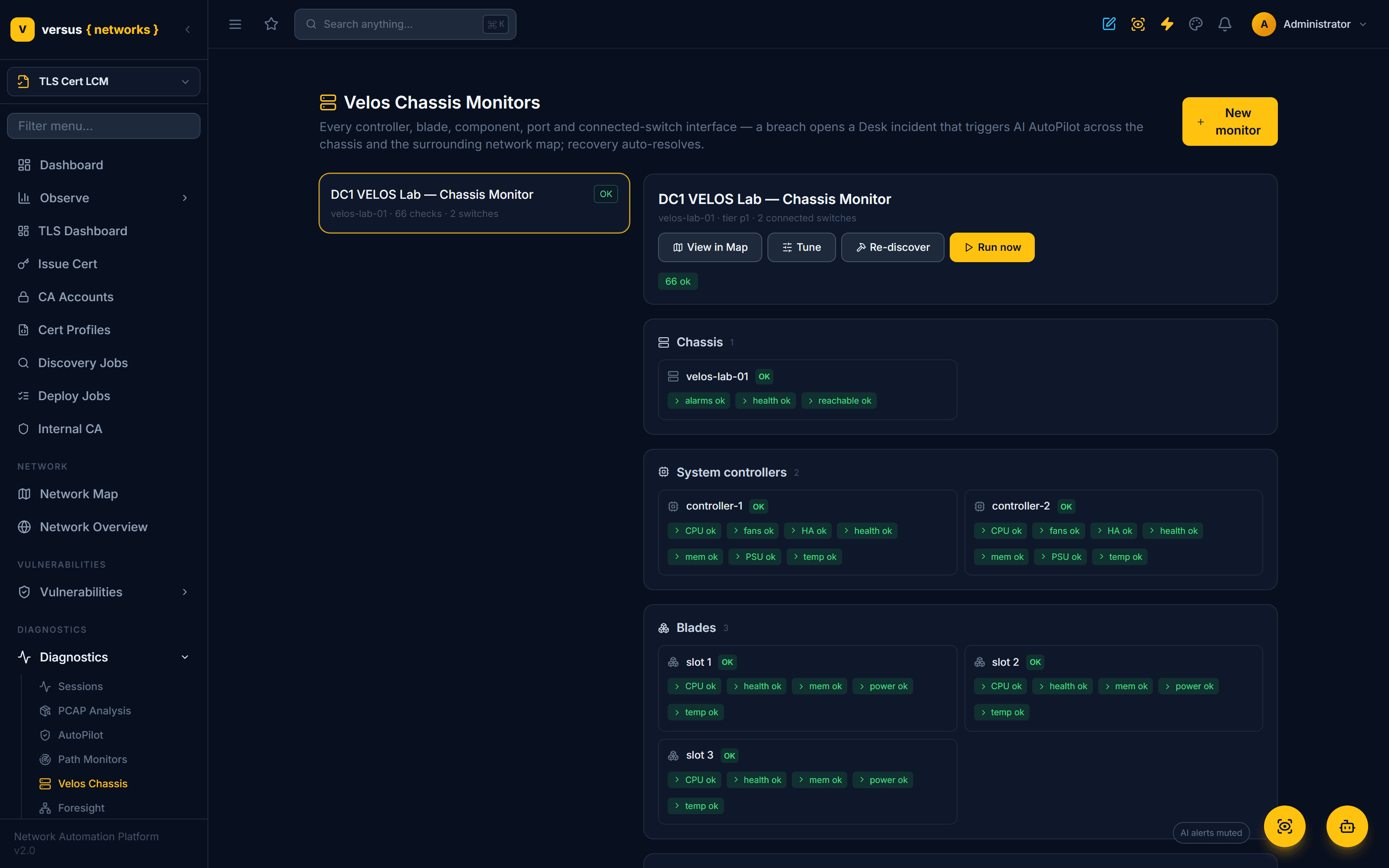
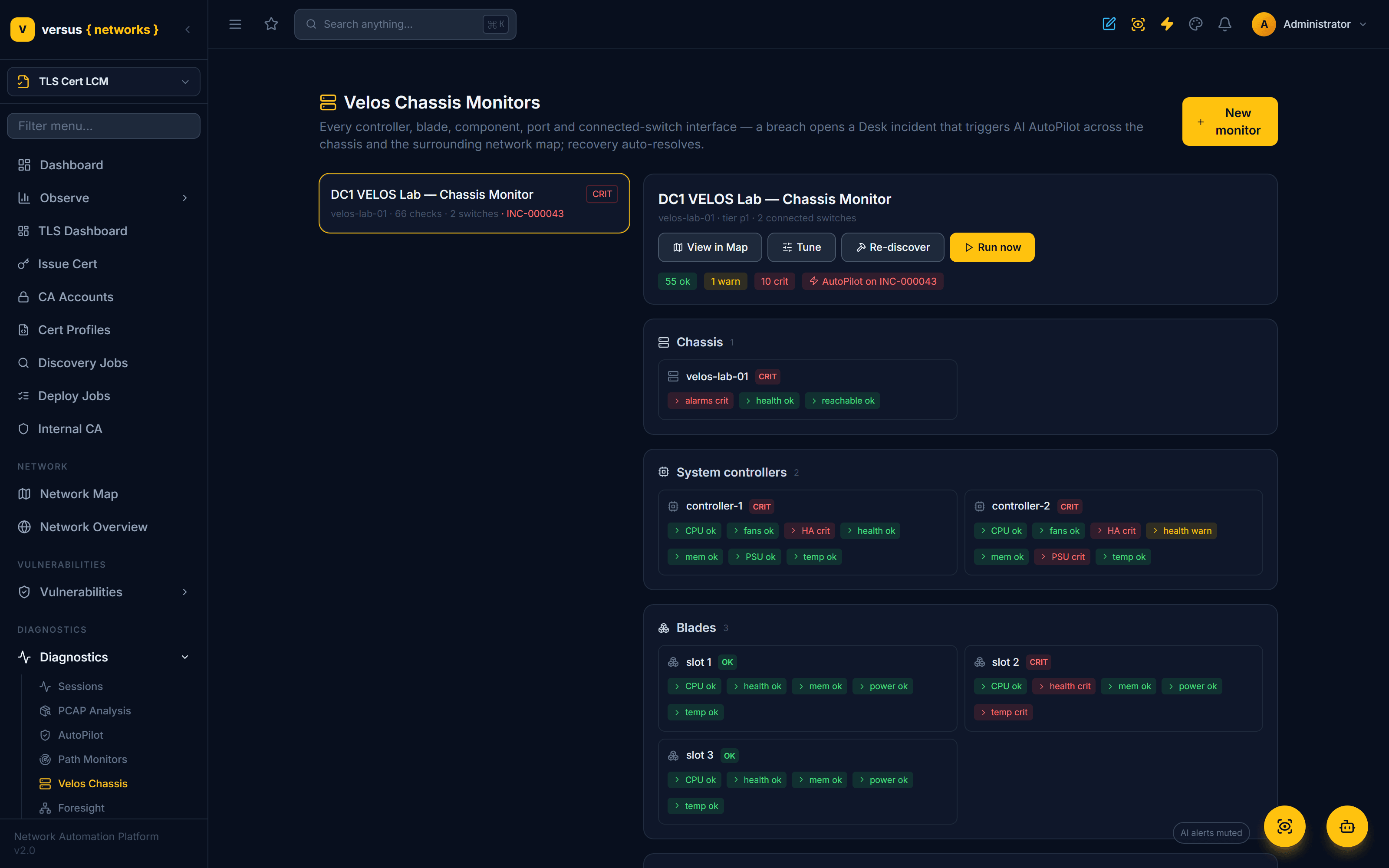
Continuous health monitoring for an F5OS / VELOS chassis — every system controller, blade, chassis power supply, front-panel port, partition, tenant guest, and license, plus the interfaces of the switches wired to it. A sustained fault opens a Versus Desk incident and hands off to AI AutoPilot, scoped to the chassis, its connected switches, and the surrounding network map. Monitors live under Diagnostics → Velos Chassis; the chassis themselves (controllers, blades, partitions, tenants) are inventoried under Inventory → F5 Chassis once their F5OS device is added.
What it watches
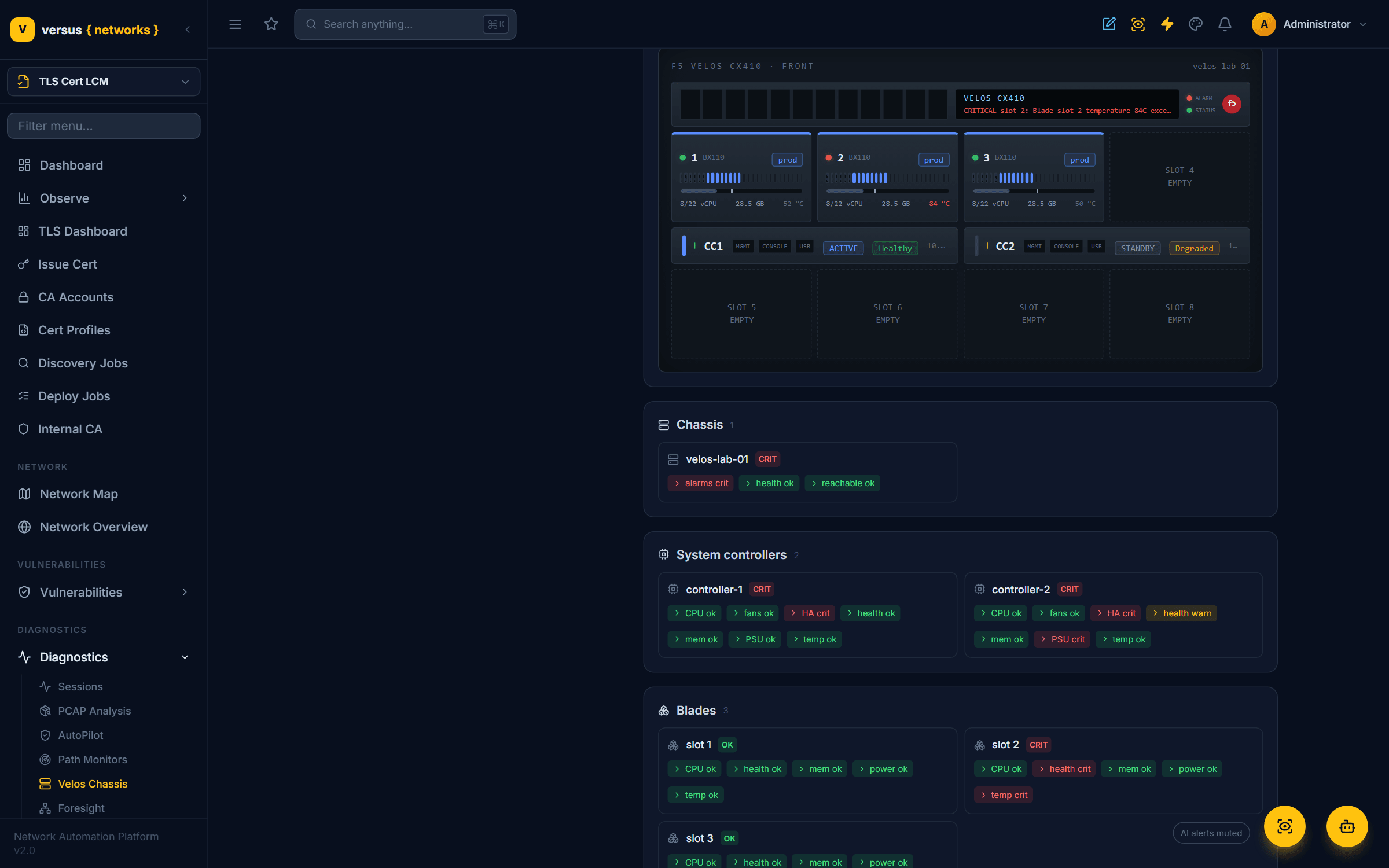
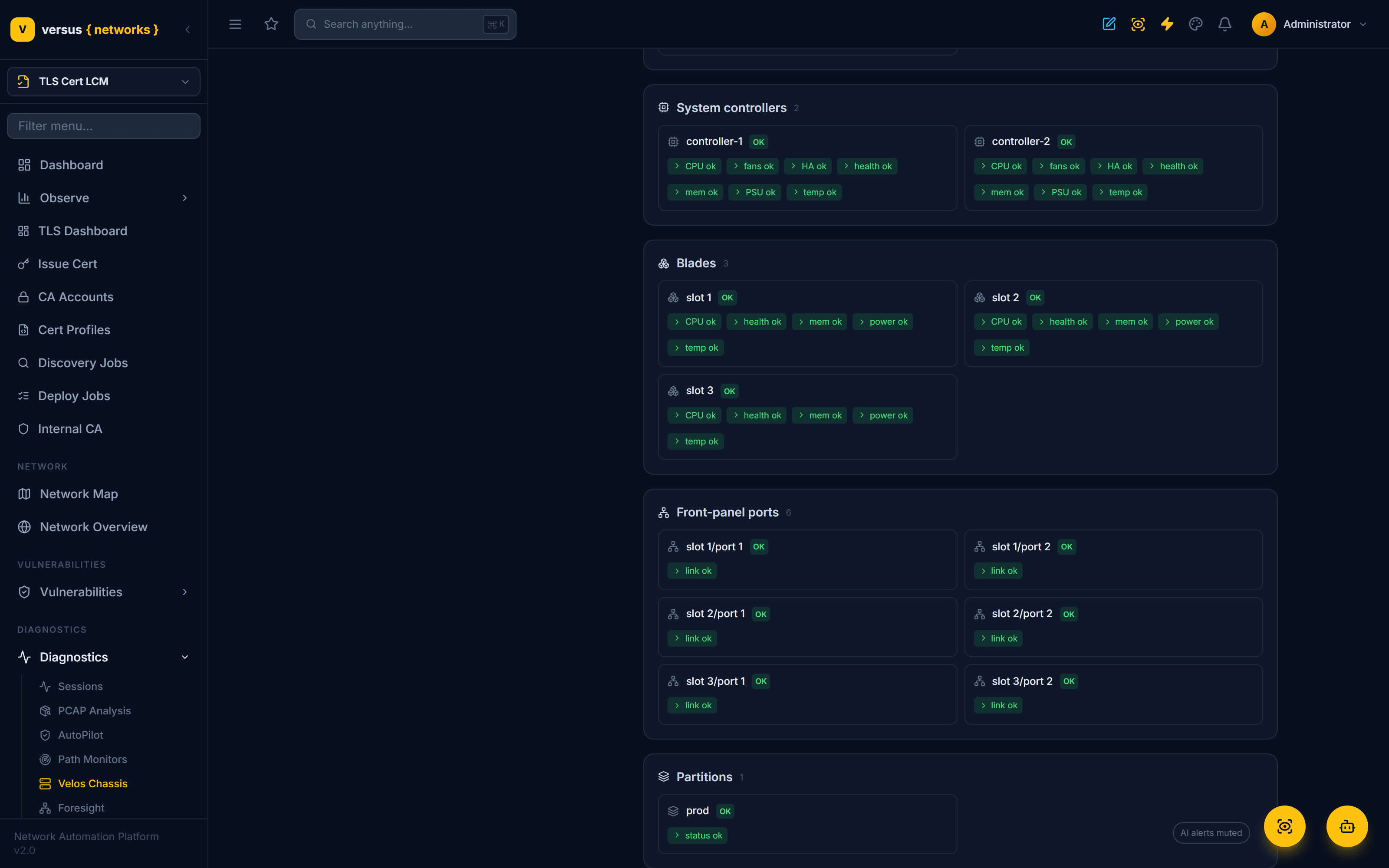
A single Velos monitor is bound to one chassis device and automatically discovers its components from the F5OS model — both system controllers, every installed blade and its front-panel ports, the chassis power supplies, the partitions and tenant guests, and the license — then seeds one tunable check per element. When Also monitor connected switches is on, it walks the CDP/LLDP topology to find the switches physically wired to the chassis and adds a check for every uplink interface.
- Reachable — The F5OS management endpoint is reachable (not unreachable/offline).
- Overall health — The chassis's rolled-up platform health is healthy.
- Active alarms — No un-cleared critical/major F5OS platform alarms.
- Health — Each controller reports healthy (not degraded/failed).
- HA / redundancy — An active peer and in-sync redundancy are intact.
- Controller PSU sensors — Every power-supply sensor reported by each controller is OK.
- Fans — Every fan unit on each controller is OK.
- Temperature — Controller temperature under the warn/crit thresholds.
- CPU — Controller CPU utilization under threshold.
- Memory — Controller memory utilization under threshold.
- Health — Each installed blade reports healthy.
- Power state — Each enabled blade is powered on.
- Temperature — Blade temperature under the warn/crit thresholds.
- CPU — Blade CPU utilization under threshold.
- Memory — Blade memory utilization under threshold.
- Link state — Each populated (SFP present) port is up, not down.
- Power supply — Each power-shelf PSU is present, its input feed is live, and it is delivering output. A failed unit or lost output is critical; a lost input feed or an empty bay is a redundancy warning.
- Partition status — Each chassis partition is running.
- Guest health — Each deployed tenant (BIG-IP) guest is operational.
- License valid — The chassis license is valid and not expired/expiring.
- Link state — Each connected-switch uplink interface stays up.
- Errors — Input/output error rate under threshold (per interval).
- Drops — Discard/drop rate under threshold (per interval).
- CRC — CRC error rate under threshold (per interval).
Enabled by default, tunable to silence false positives
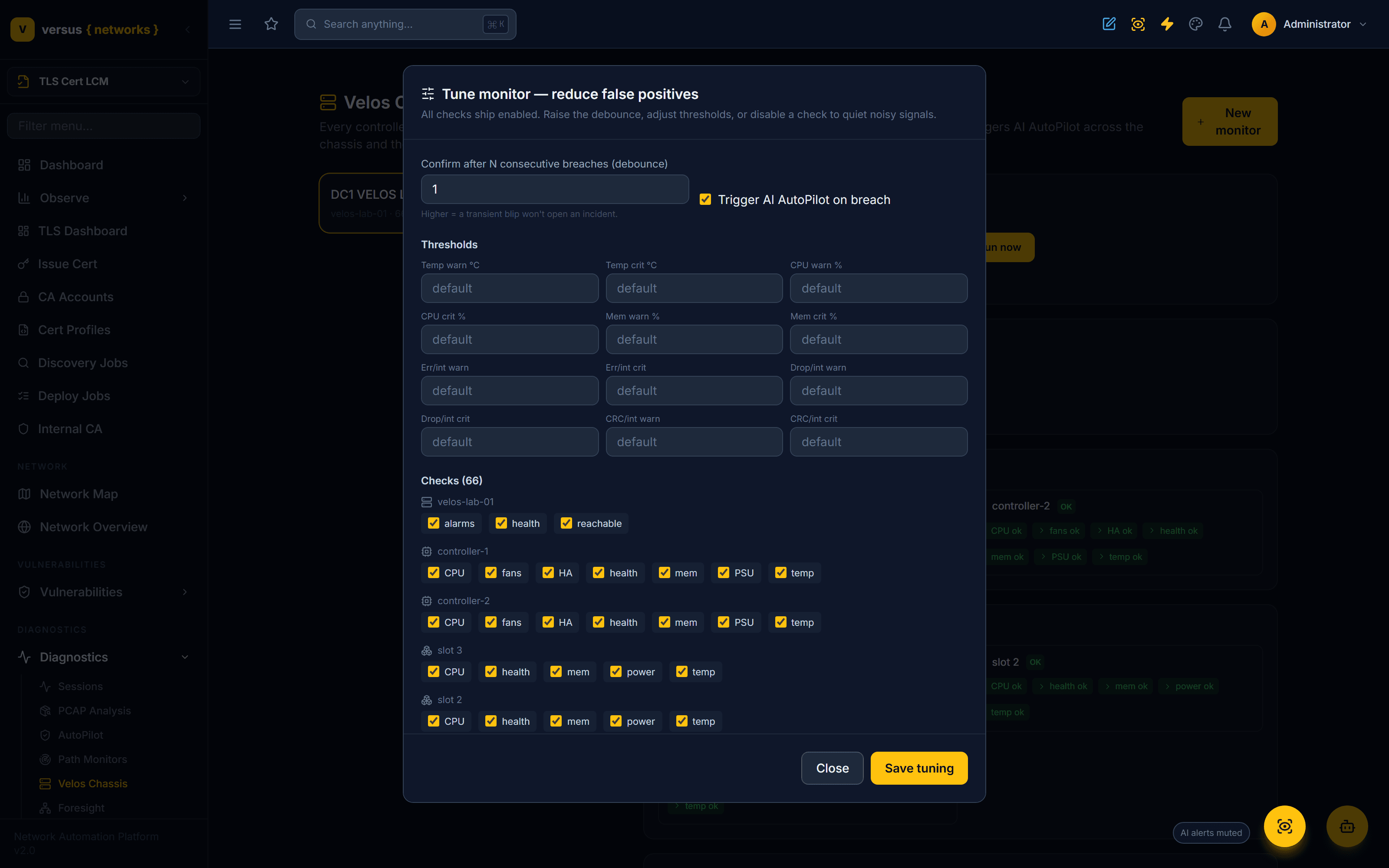
Every check ships enabled — you get full coverage the moment you build a monitor. From there you tune it down to your environment's tolerance, so a transient blip never pages anyone:
- Debounce — require N consecutive breaches before an incident opens. Mission-critical monitors confirm on the first breach; raise it for noisy signals.
- Thresholds — temperature, CPU, memory, and the per-interval error / drop / CRC rates are all adjustable, per monitor or per individual check.
- Per-check toggles — switch off any single check (say, a blade port you know is intentionally down) without losing the rest of the coverage.
- AutoPilot toggle — decide whether a breach triggers an AI investigation at all.
From breach to autonomous diagnosis
When a check breaches for long enough to clear its debounce, the monitor runs the whole loop on its own:
Detect & confirm. The element breaches its threshold; after the debounce count, the monitor escalates (transient blips are suppressed as flaps).
Open a Desk incident. One priority-scaled INC per chassis (deduped), with the chassis and every connected switch attached as configuration items — so the investigation starts with the full blast radius.
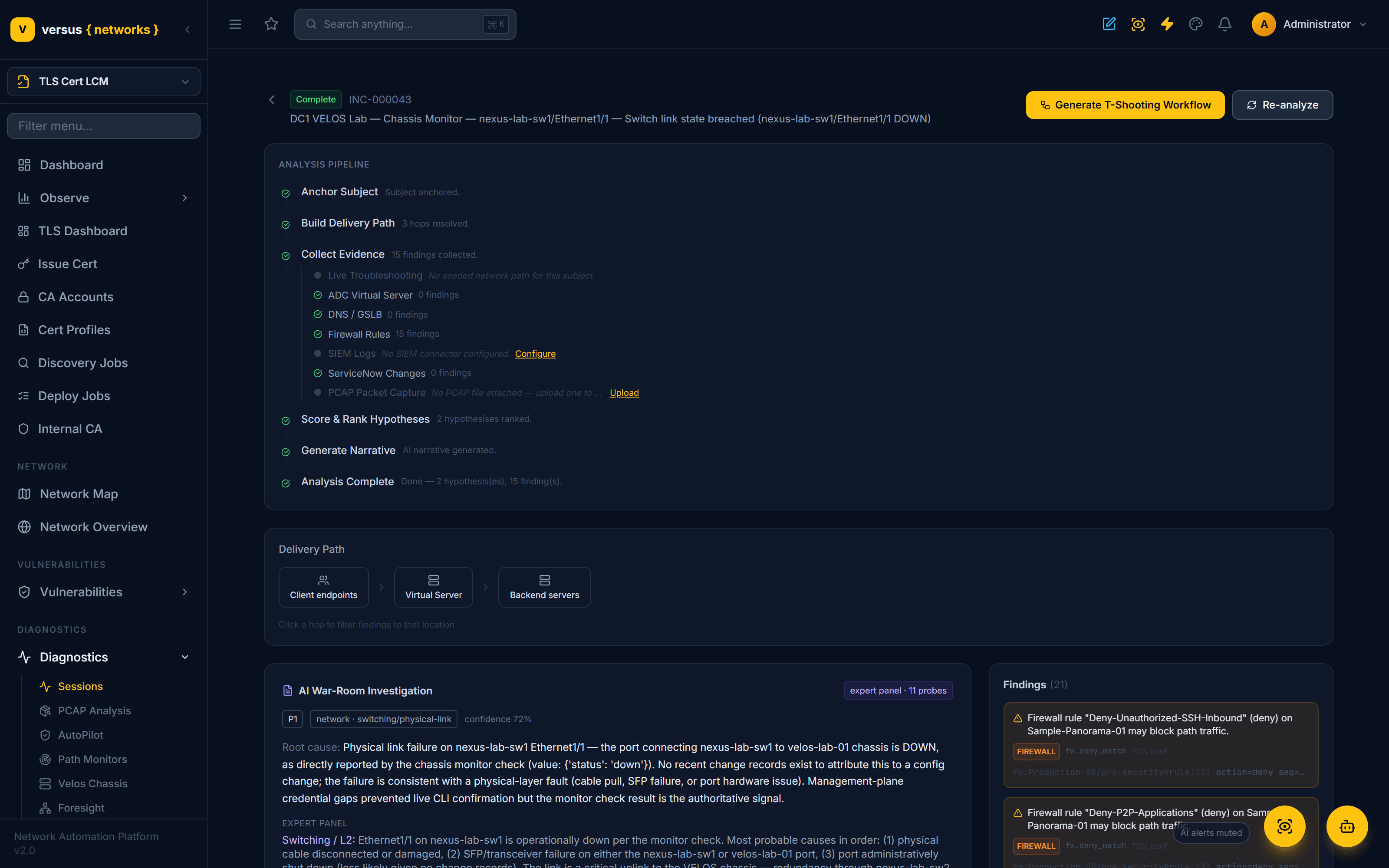
Trigger AutoPilot. An AI war room is convened, scoped to the chassis and its connected switches and grounded in the surrounding network map, correlating hardware, redundancy, and fabric symptoms into a root cause.
Govern the fix. Remediation is gated by severity — read-only diagnosis, a fix held for approval, or (on P1, when enabled) autonomous execution.
Auto-resolve. When every check returns to healthy, the monitor resolves its incident automatically.
Connected-switch interface monitoring
A chassis is only as healthy as the fabric it plugs into, so the monitor watches the switch side too. For every connected-switch interface it tracks link state directly, and computes rates for input/output errors, discards, and CRC errors by differencing consecutive counter snapshots — so a port that is quietly accumulating CRC errors is caught as a rising rate, not just an absolute count. Thresholds are per-interval and fully tunable.
How it runs
The recurring sweep is driven by an in-process scheduler that is opt-in(VELOSMON_SCHEDULER_ENABLED) and gated to scheduler-owning processes with a cross-worker advisory lock — so the feature ships inert. Checks also run on demand from the Run now button or the run_velos_monitors management command (cron / scheduled task). Each check honours its own interval, and mission-critical monitors sweep most frequently.
Real F5OS devices
Against a real chassis, the monitor refreshes component health from the device through the Versus collector (the f5os.chassis_health operation) before each sweep — an opt-in per monitor (live_poll) so demo and lab environments read their last-known model data without a round-trip. Credentials are resolved on the collector and never leave the customer network.
Related
- Diagnostics AutoPilot — the governed AI investigation and remediation engine a breach hands off to.
- Diagnostics — Sessions & PCAP — the broader root-cause layer.
- F5 Report Card — device-level health scoring for F5 platforms.