Virtual Servers & Pool Management
A unified, cross-device inventory of every virtual server Versus has discovered — and, one click in, a live dashboard plus generated Ansible, AS3, and TMSH representations of that VS.
Overview
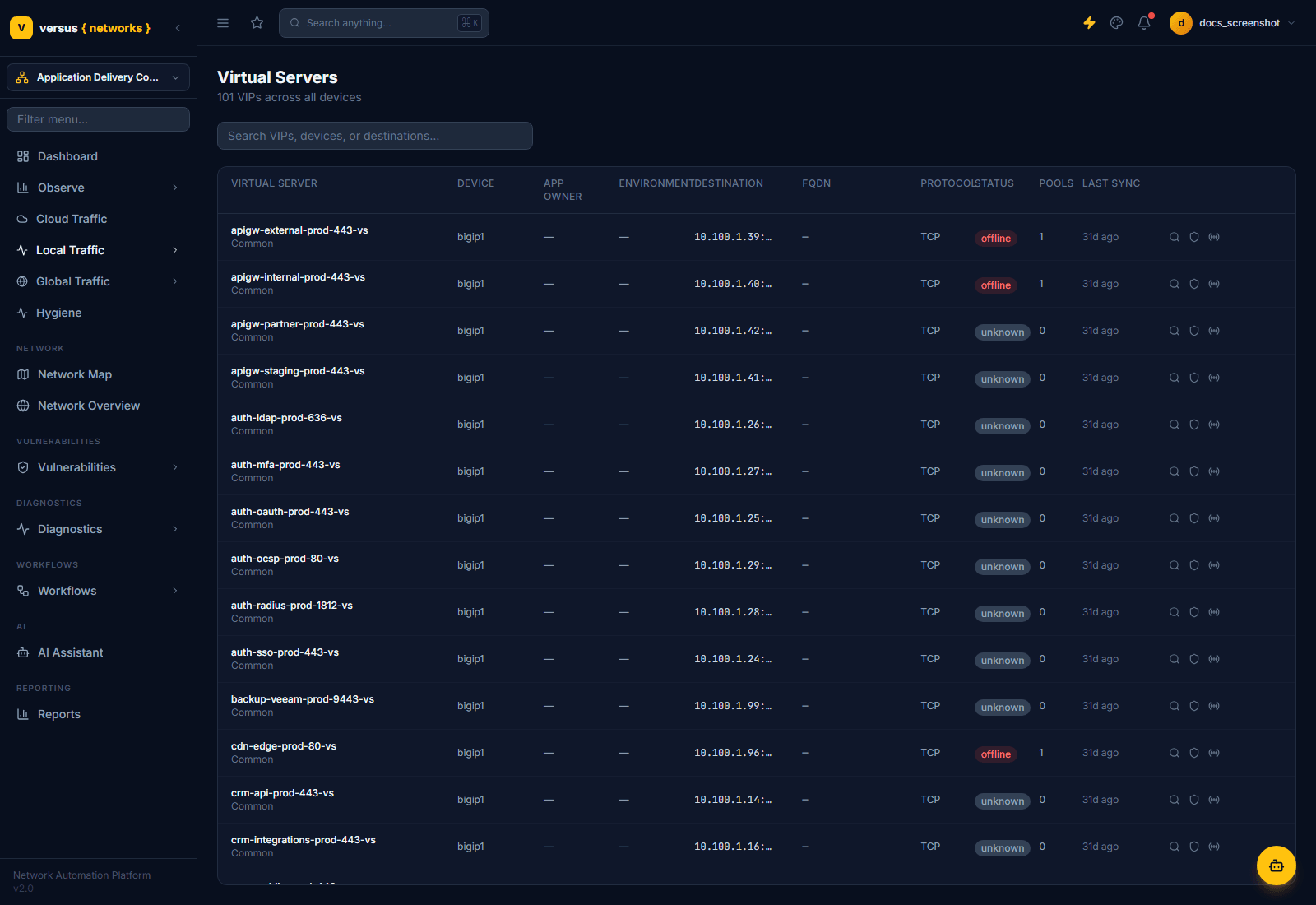
Switch the workspace switcher at the top of the sidebar to Application Delivery Controller, then open Local Traffic → Virtual Servers (URL: /applications/virtual-servers). This view aggregates virtual servers from every ADC and Cloud WAF / Bot device in inventory — F5 BIG-IP, NetScaler, and others — into one searchable list, rather than requiring you to check each device separately.
Data reflects the state of your ADCs and Cloud WAF / Bot platforms as of their last discovery run; each row's Last Sync column shows how fresh that is.
The Virtual Servers List
Each row shows:
- Virtual Server — the VS object name and its partition (e.g.
Common) - Device — which ADC this VS belongs to
- App Owner / Environment — ownership metadata, set from the VS detail page; shows
—until assigned - Destination — the VIP:port the VS listens on
- FQDN — a discovered hostname, if any, or
— - Protocol — TCP, UDP, HTTP, or HTTPS as reported by the device
- Status — a badge reflecting the VS's health as last discovered (see Quick Reference below)
- Pools — count of pools attached to this VS
- Last Sync — how long ago this row was last refreshed by discovery
A single search box (Search VIPs, devices, or destinations...) filters the list by free text across VS name, device, and destination — there is no separate multi-field filter panel on this view.
Opening a Virtual Server
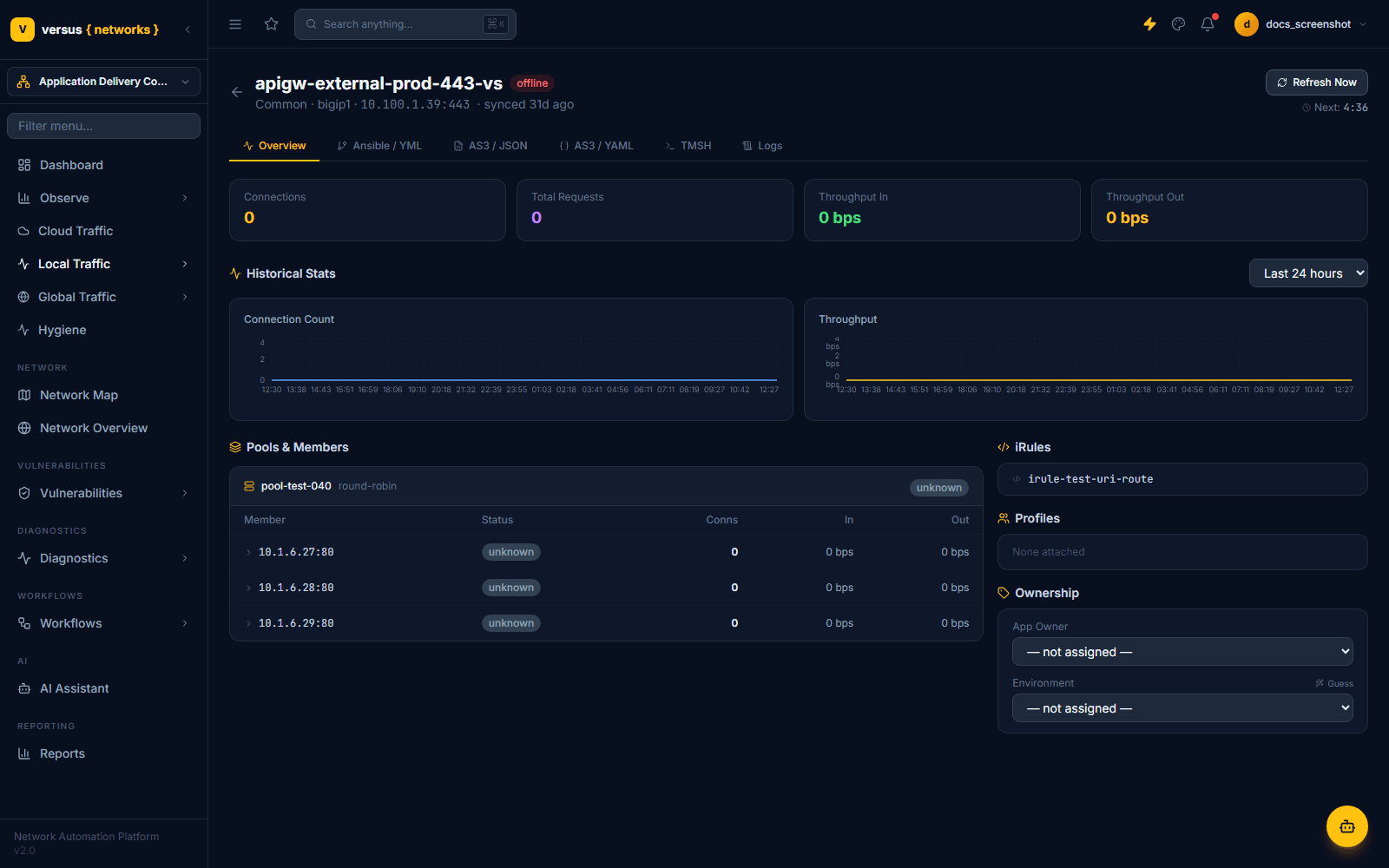
Click any row to navigate to a dedicated detail page for that VS (not a slide-in panel) — the URL changes and a back arrow returns you to the list. The header repeats the VS name, its status badge, partition, owning device, destination, and last-sync time, and offers a Refresh Now button with a countdown to the next automatic refresh.
The page is organized into six tabs:
- Overview — live stat tiles, historical charts, pool members, iRules, profiles, and ownership
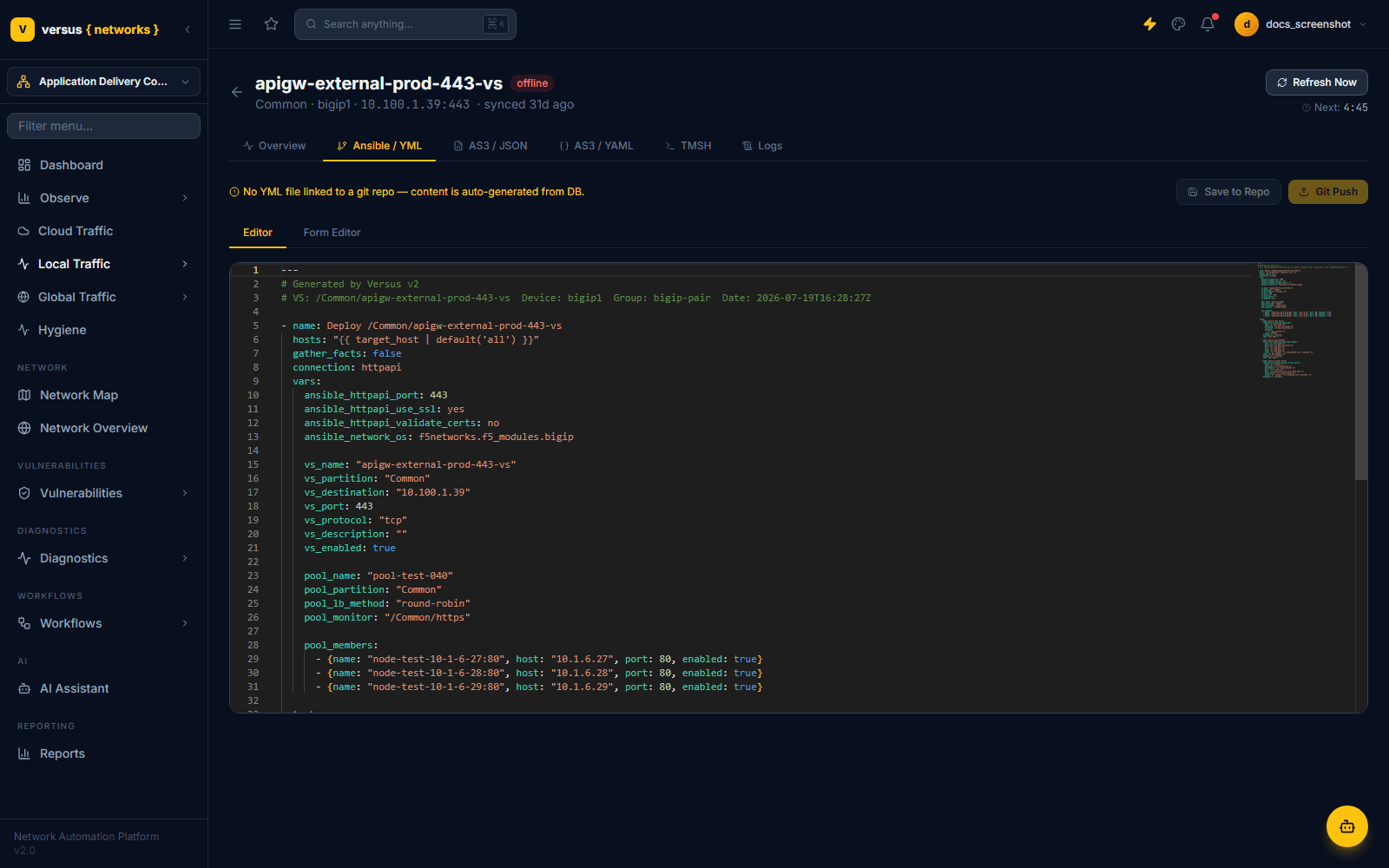
- Ansible / YML — an auto-generated Ansible playbook for this VS
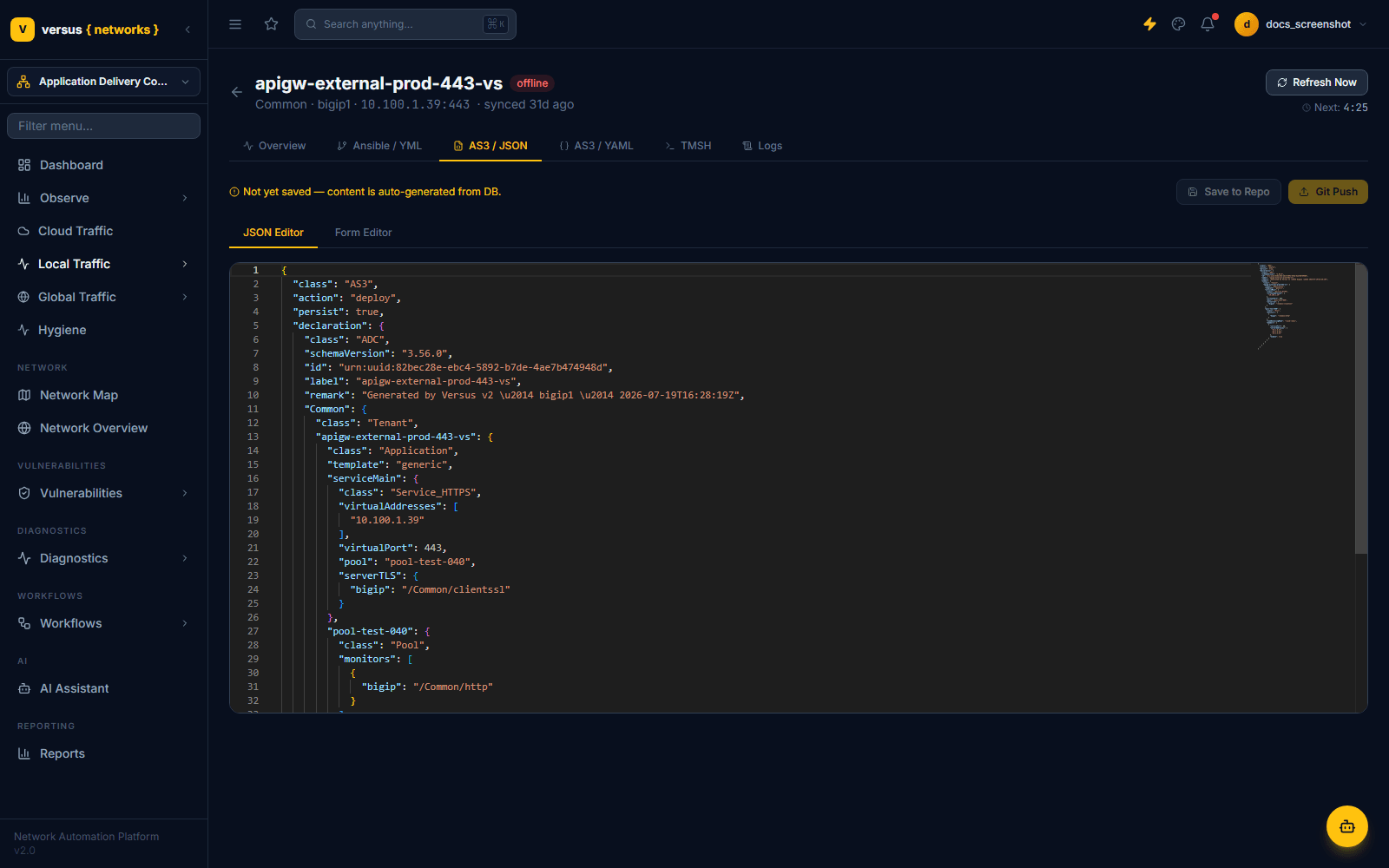
- AS3 / JSON — an auto-generated F5 AS3 declaration
- AS3 / YAML — the same AS3 declaration in YAML form
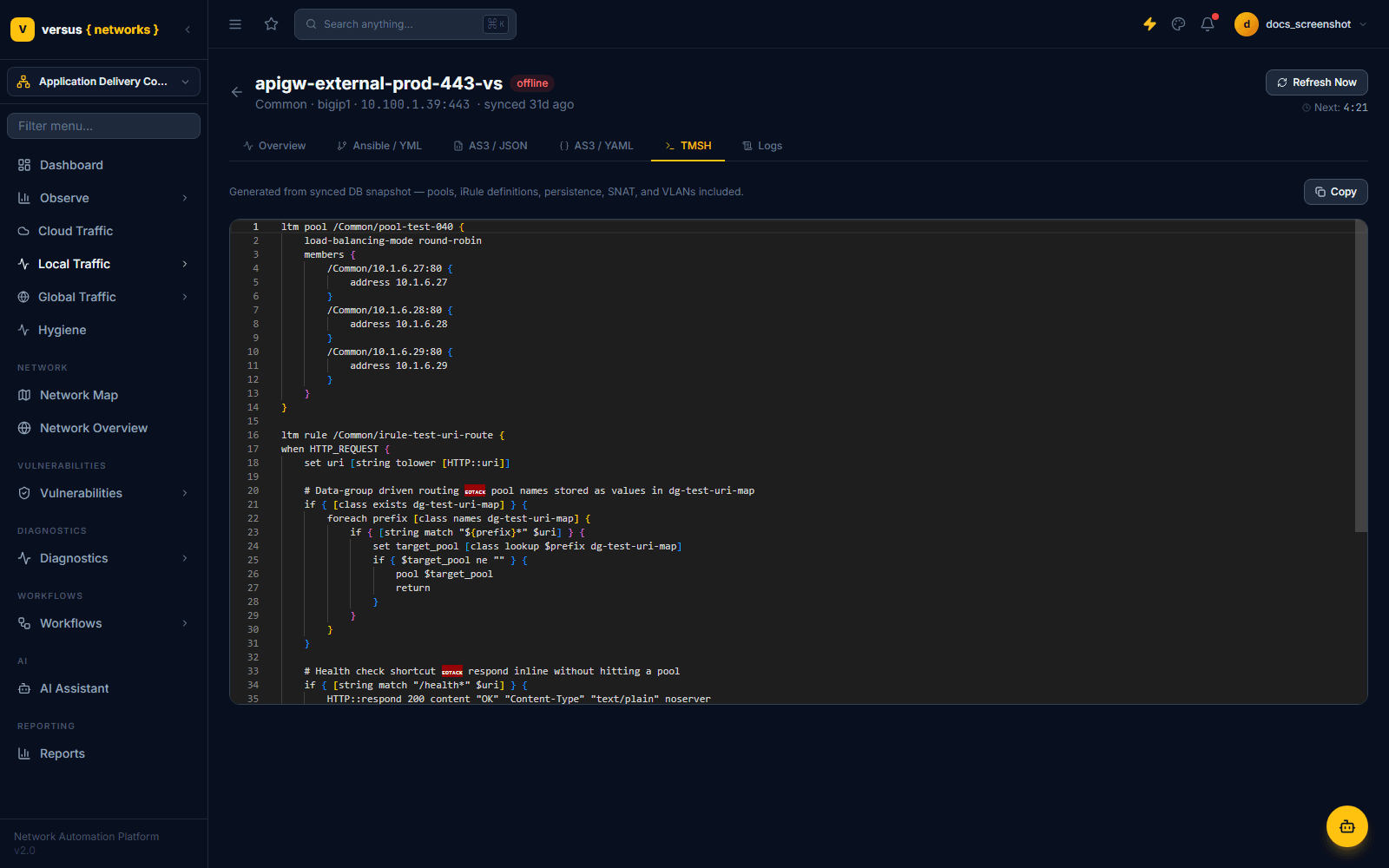
- TMSH — the equivalent
tmshconfiguration, including full iRule source - Logs — recent activity for this VS
The Overview Tab
The Overview tab is a live operational dashboard for the VS, not just a config summary:
- Stat tiles — Connections, Total Requests, Throughput In, and Throughput Out, refreshed on demand or on the next auto-refresh cycle
- Historical Stats — Connection Count and Throughput charts with a selectable time range (default: Last 24 hours)
- Pools & Members — each pool's load-balancing method and status, with a per-member table of address:port, status, current connections, and in/out throughput
- iRules — the iRules attached to this VS, by name (F5 only)
- Profiles — client-SSL / server-SSL and other profiles attached to the VS; shows None attached when none are configured
- Ownership — App Owner and Environment dropdowns; Environment includes a Guess shortcut that infers a value from naming conventions
unknown status usually means the health monitor hasn't reported a result yet, not that the backend is down — check the monitor definition and its polling interval if a member sits at unknown for longer than expected.Generated Ansible, AS3, and TMSH
The remaining tabs render the same virtual server as infrastructure-as-code, generated live from Versus's synced database snapshot — useful both for review and as a starting point for GitOps:
- Ansible / YML — a playbook using the
f5networks.f5_modules.bigipcollection, with VS, pool, and pool-member variables filled in - AS3 / JSON and AS3 / YAML — an F5 Application Services 3 (AS3) declaration with a
Tenant/Application/serviceMainstructure matching the VS's actual pool, monitor, and TLS configuration - TMSH — the native
tmshconfig block for the VS's pool and any attached iRules, including the full iRule source — useful for a quick read without opening the BIG-IP CLI
Each of the Ansible and AS3 tabs offers a JSON Editor / Form Editor (or Editor / Form Editor) toggle, plus Save to Repo and Git Push actions — until saved, a banner reads Not yet saved — content is auto-generated from DB.
Quick Reference
| Status Badge | Colour | Meaning |
|---|---|---|
| offline | Red | VS did not respond as expected at last discovery |
| unknown | Grey | No health result yet — monitor hasn’t reported, or discovery hasn’t run since the VS was added |
Exact status values reflect whatever the device's own health evaluation reports at discovery time — a VS whose pool members are all passing health checks reports differently from one that is administratively disabled.