ServiceNow Integration
Versus keeps the CMDB honest against the live estate, drives the full ITSM lifecycle from automation, syncs both ways, and lets a ServiceNow incident kick off proactive troubleshooting — all governed and fail-closed.
Overview
Versus runs the live network estate — F5, Palo Alto, NetScaler, routers and switches, cloud WAF — while ServiceNow is the system of record. The integration connects the two so the CMDB reflects what is actually deployed and every change is governed in ServiceNow. It spans nine capabilities, each covered below:
- Connect & prove — a health check that surfaces live CMDB and ITSM counts.
- Deep CMDB discovery — every CI class (including your custom classes) plus relationships.
- CI Discovery: import / merge / enrich — bring CIs into Versus and write live truth back to the CMDB.
- CMDB drift — reconcile the record against reality, with governed remediation and undo.
- Full ITSM nodes — Incident / Request / Change / Problem, driven from workflows.
- Two-way sync — Versus Desk ⇄ ServiceNow, loop-safe.
- Triggers & Event Management — an inbound webhook starts a workflow; outbound events feed ITOM.
- MCP-first routing — prefer a ServiceNow MCP tool when available, Table API otherwise.
- Proactive troubleshooting — a ServiceNow incident triggers AutoPilot.
One unified client talks to ServiceNow over the Table API (/api/now/table/<table>), the Aggregate API (for counts), the Identification & Reconciliation Engine (for governed write-back), the Import Set and Attachment APIs, and — where available — a ServiceNow MCP server.
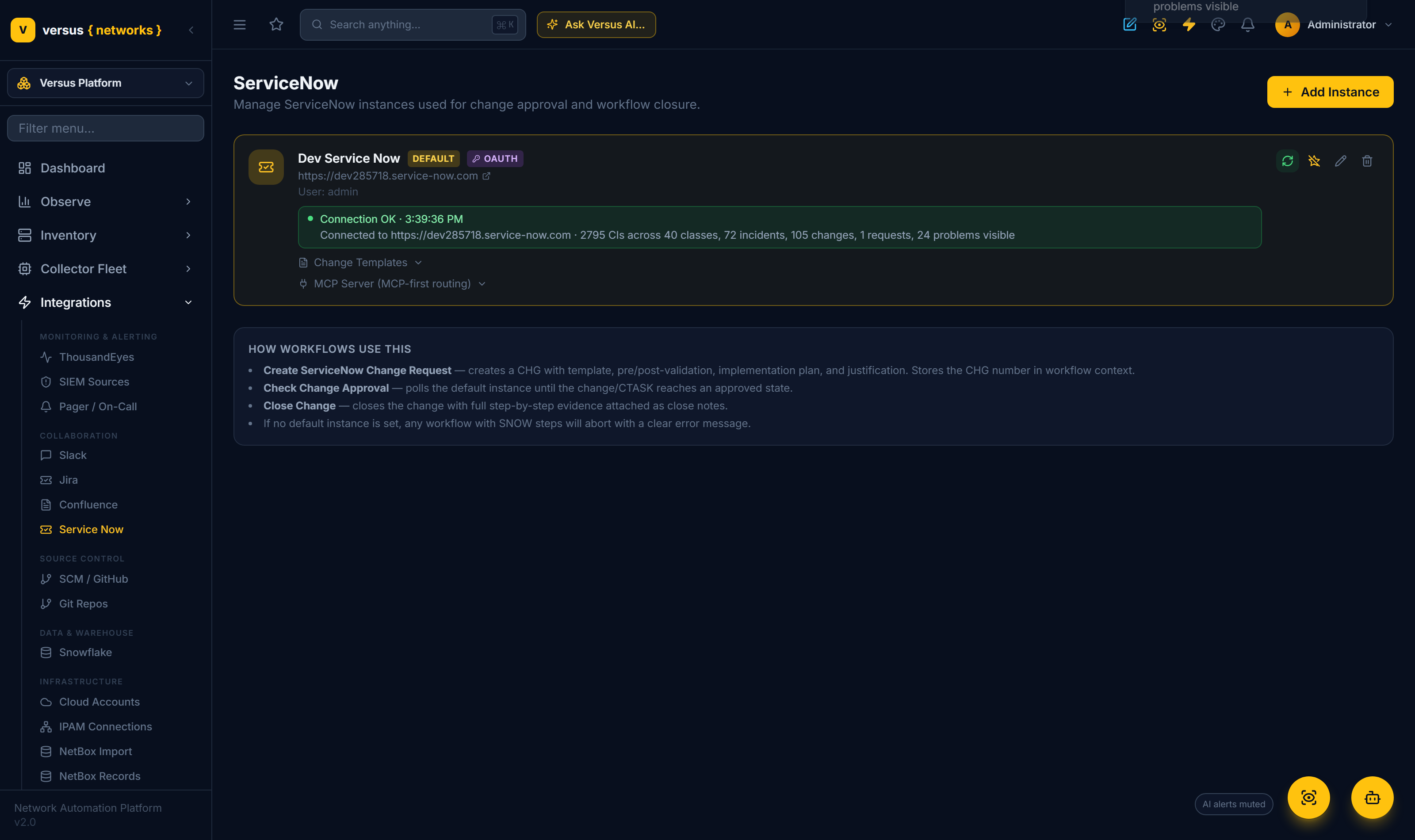
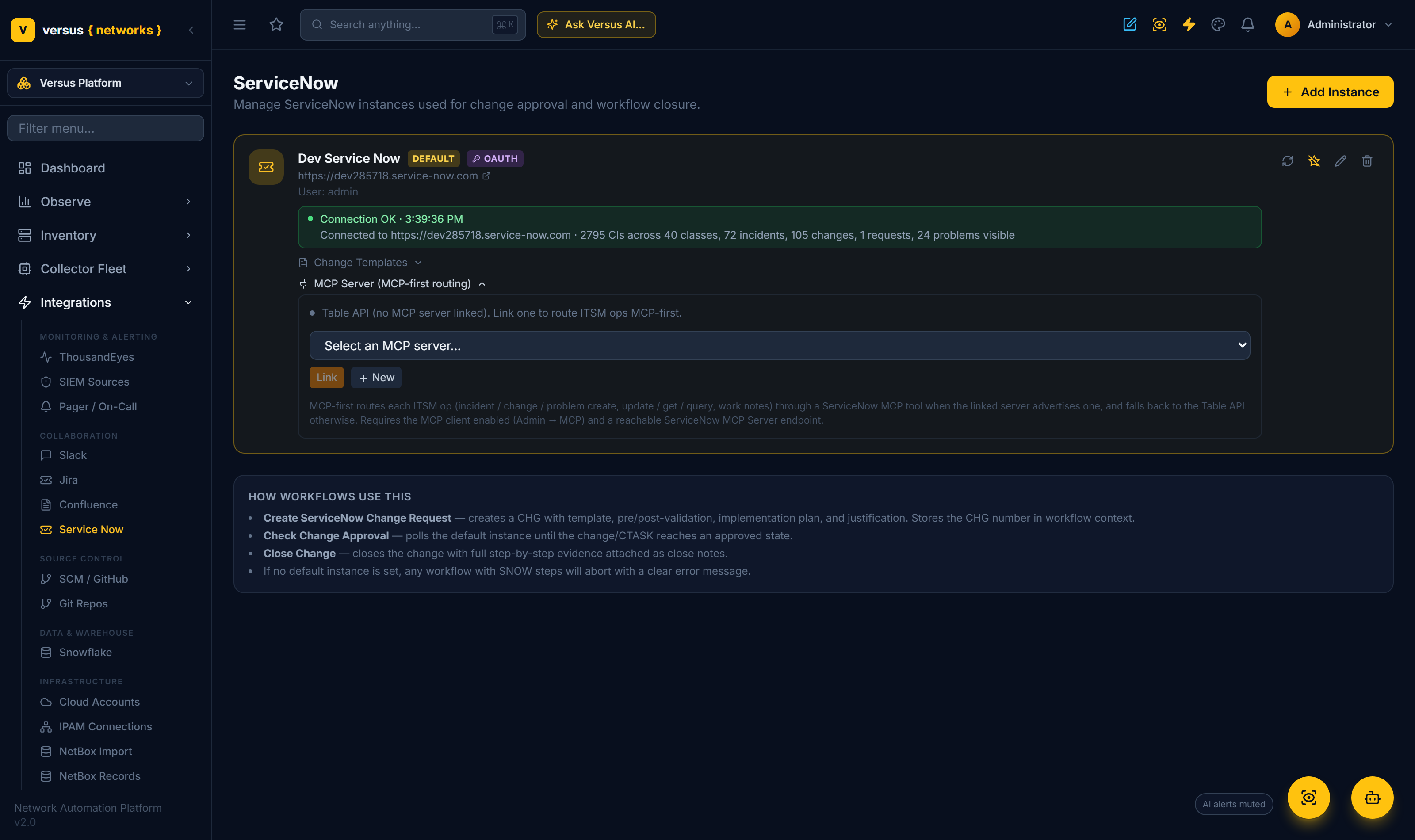
Under Integrations → Service Now, add an instance with its URL and credentials (Basic auth or OAuth 2.0 password grant), and mark one as the default. Click the ↻ Testcontrol and the result persists on the card with a concrete, tangible summary of what the credential can actually see:
Connected to https://dev12345.service-now.com · 2,795 CIs across 40 classes, 72 incidents, 105 changes, 1 request, 24 problems visibleFailures persist too, surfacing ServiceNow's real error detail (a 401 reason, redirect or proxy hints) so you can tell a wrong password from a dropped Authorization header.
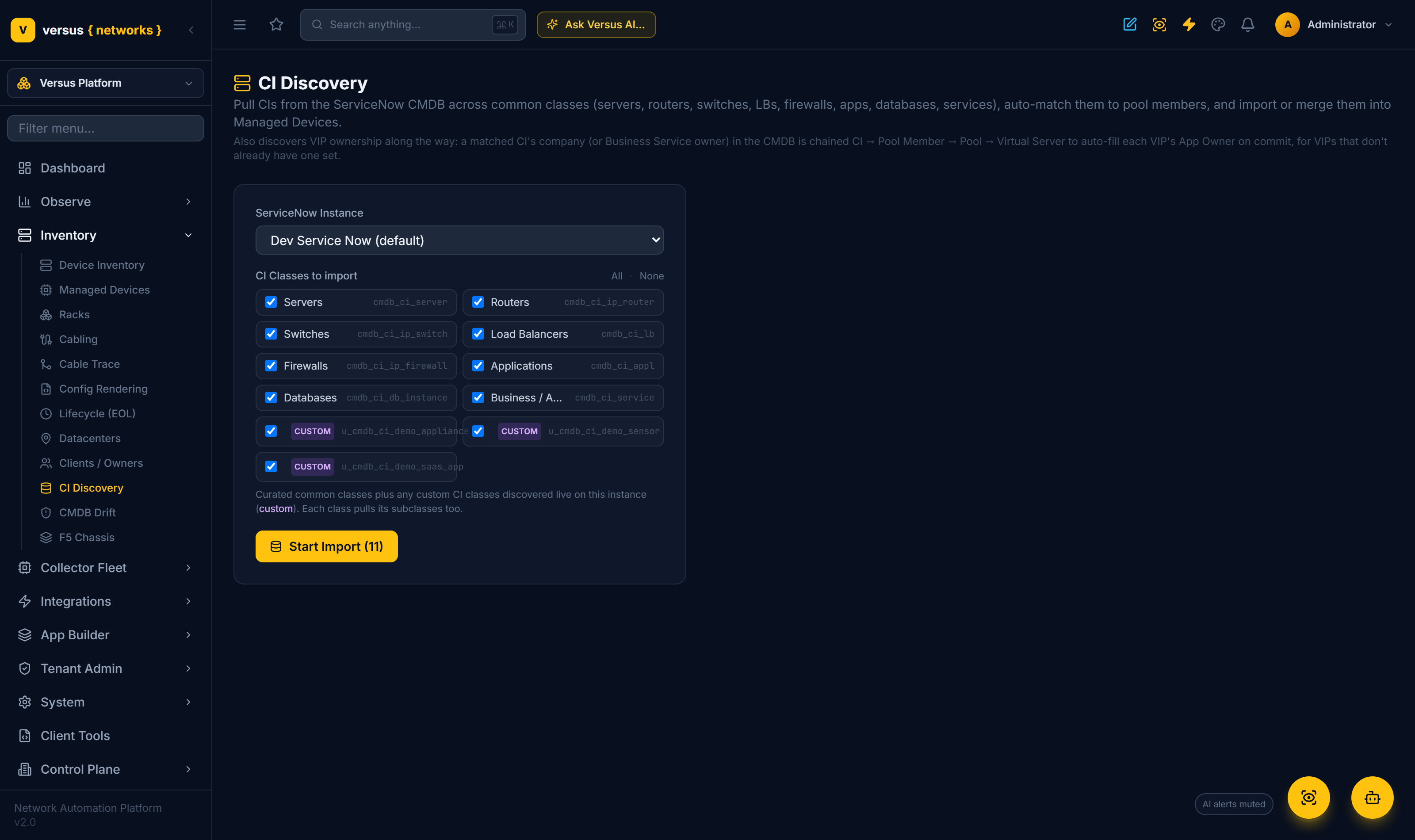
Inventory → CI Discovery crawls the CMDB across every common class — servers, routers, switches, load balancers, firewalls, applications, databases and services — not just pool members. The Start Import panel discovers the instance's classes live, including your customu_cmdb_ci_* classes (badged custom), and a checkbox picker lets you choose exactly what to import. cmdb_rel_ci relationships come in too, so the documented topology can overlay the discovered one on the Network Map.
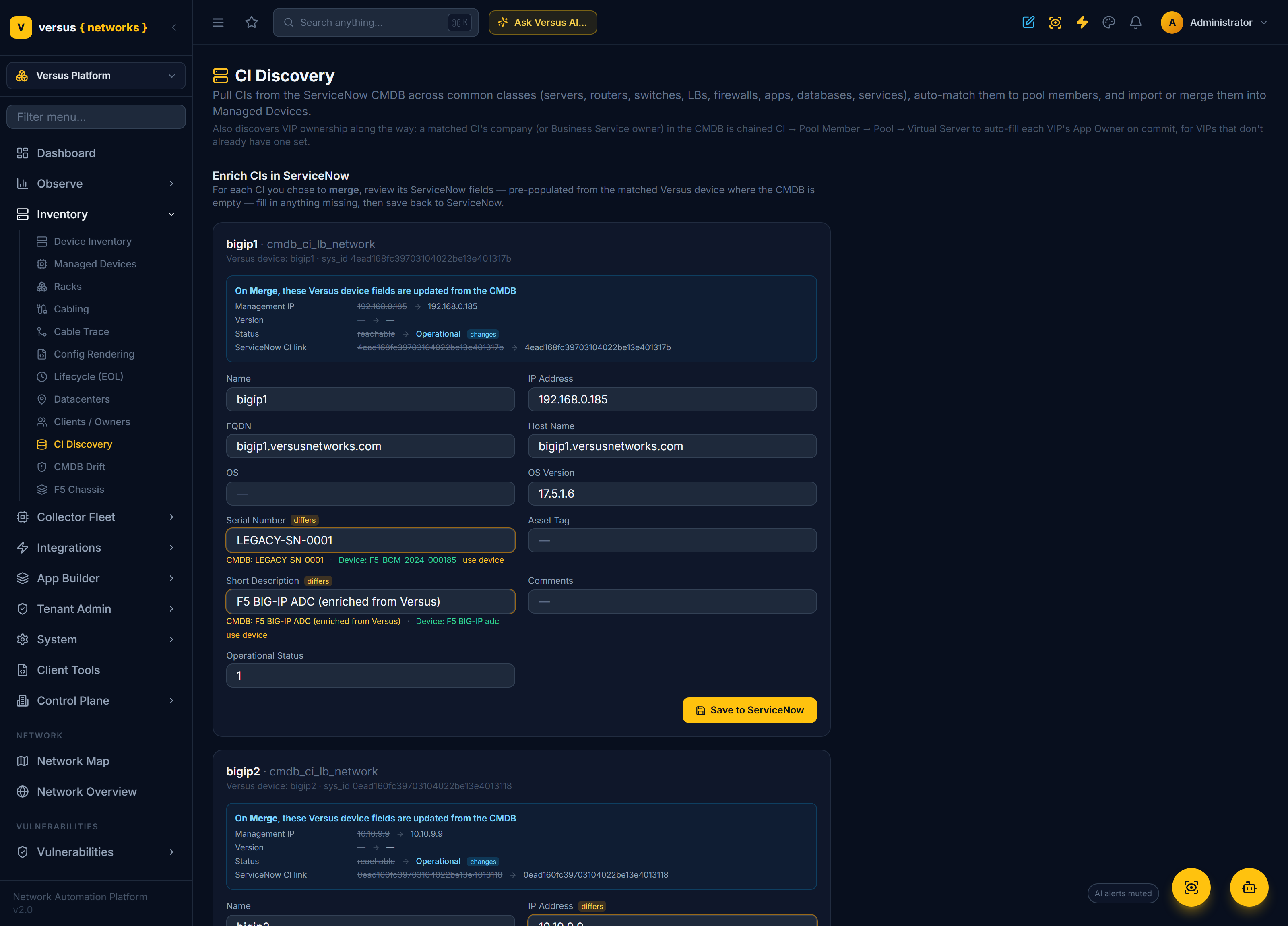
Import, merge — and enrich the CMDB from reality
Review each CI and choose Import (create a new Managed Device), Merge(into an existing one), or Skip — with bulk Import all matched / Skip all unmatched / Skip all actions.
Choosing Merge then Next opens the Enrich step. For each merged CI, Versus pulls the CI's ServiceNow fields and pre-populates them from the matched Versus device:
- A field empty in the CMDB is filled from Versus and badged "from Versus" (e.g. FQDN, OS version, serial number).
- A field where the CMDB differs from the live device is highlighted "differs", showing
CMDB: … · Device: …with a one-click use device — for example a serial number stale in ServiceNow versus the appliance. - A "On Merge, these Versus device fields are updated" panel previews exactly what the merge writes back onto the Versus device.
Fill anything still missing and Save to ServiceNow writes it back to the CI.
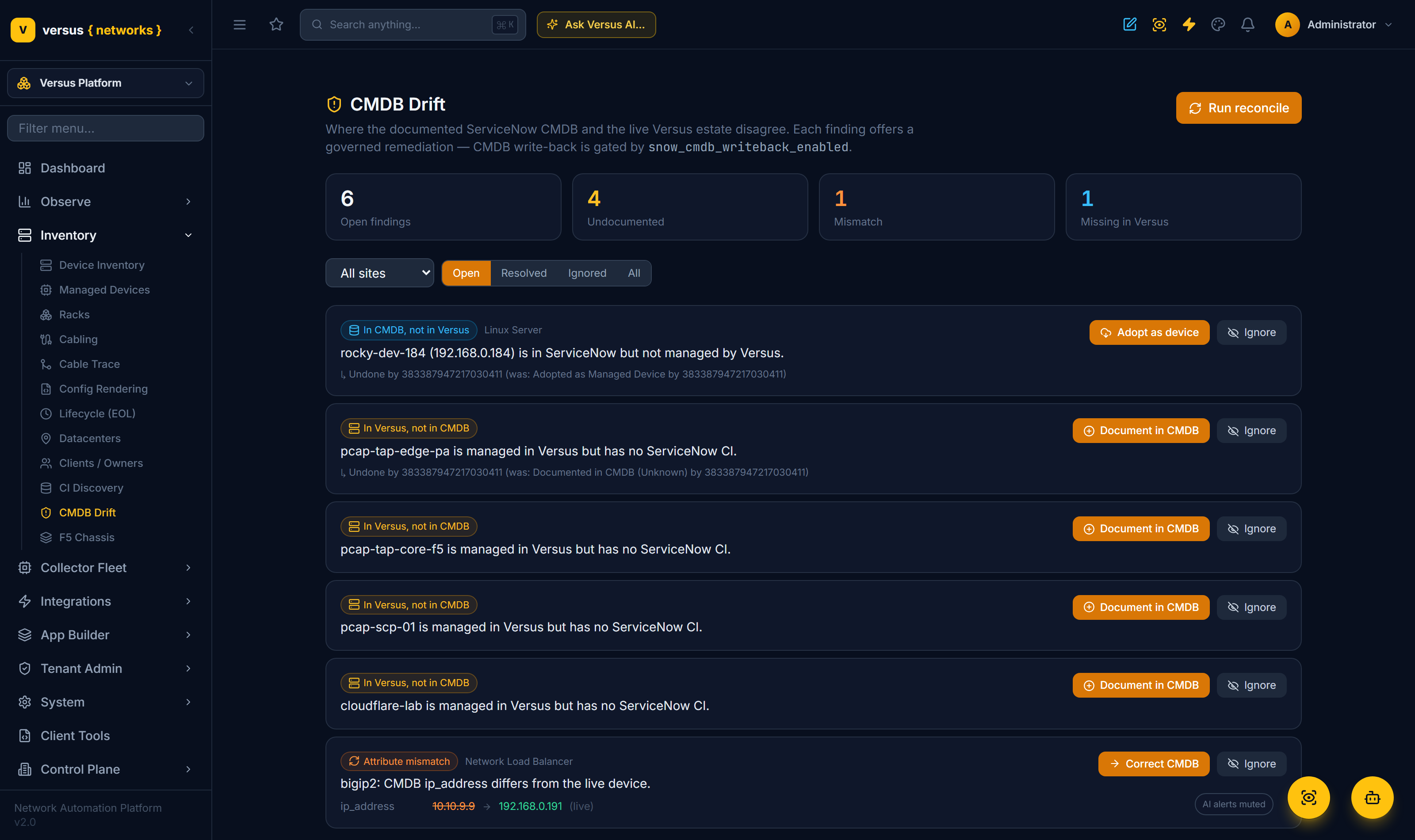
Inventory → CMDB Drift reconciles the documented CMDB against the live Versus estate and records three kinds of finding:
- Undocumented — a device in Versus with no CI.
- Attribute mismatch — a CI whose values differ from the live device.
- Missing in Versus — a CI in the site's address space Versus does not manage.
Each finding offers a governed remediation — Document (write the device to the CMDB via IRE), Correct (push the live value back), Adopt (make the CI a Managed Device), or Ignore — every action recorded in a Recent-actions log and reversible with Undo. CMDB writes are fail-closed: nothing reaches ServiceNow unless write-back is explicitly enabled.
CI Discovery populates; Drift keeps it in sync — the standing watch that detects and fixes where the record and reality diverge.
The workflow editor's ServiceNow palette carries 30 nodes covering the whole ITSM surface: create/update/resolve/close Incident, order Requestitems, create/approve/close Change, open Problem, plus work notes, attachments, approval-wait, affected-CI links, generic table read/write, and Event Management.
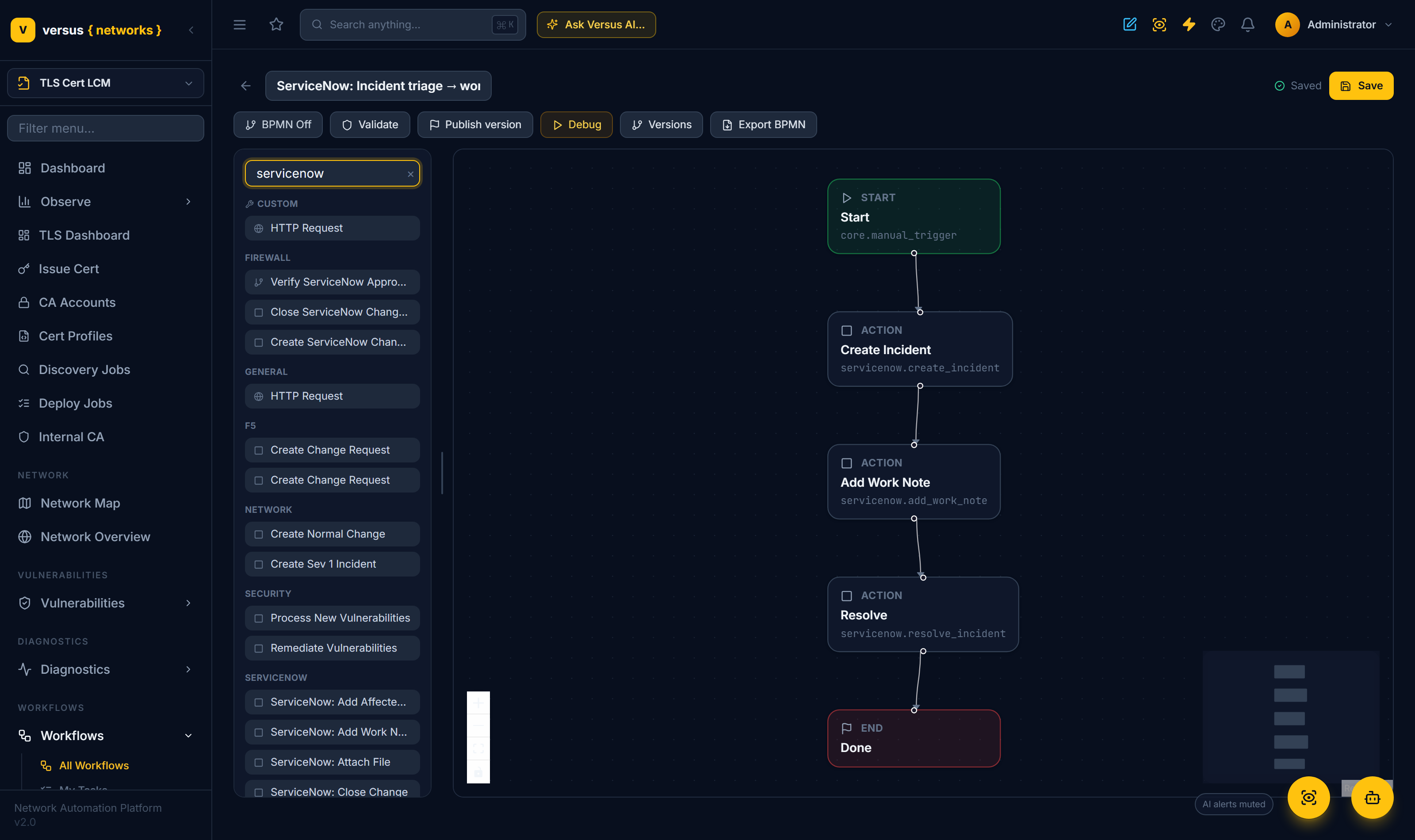
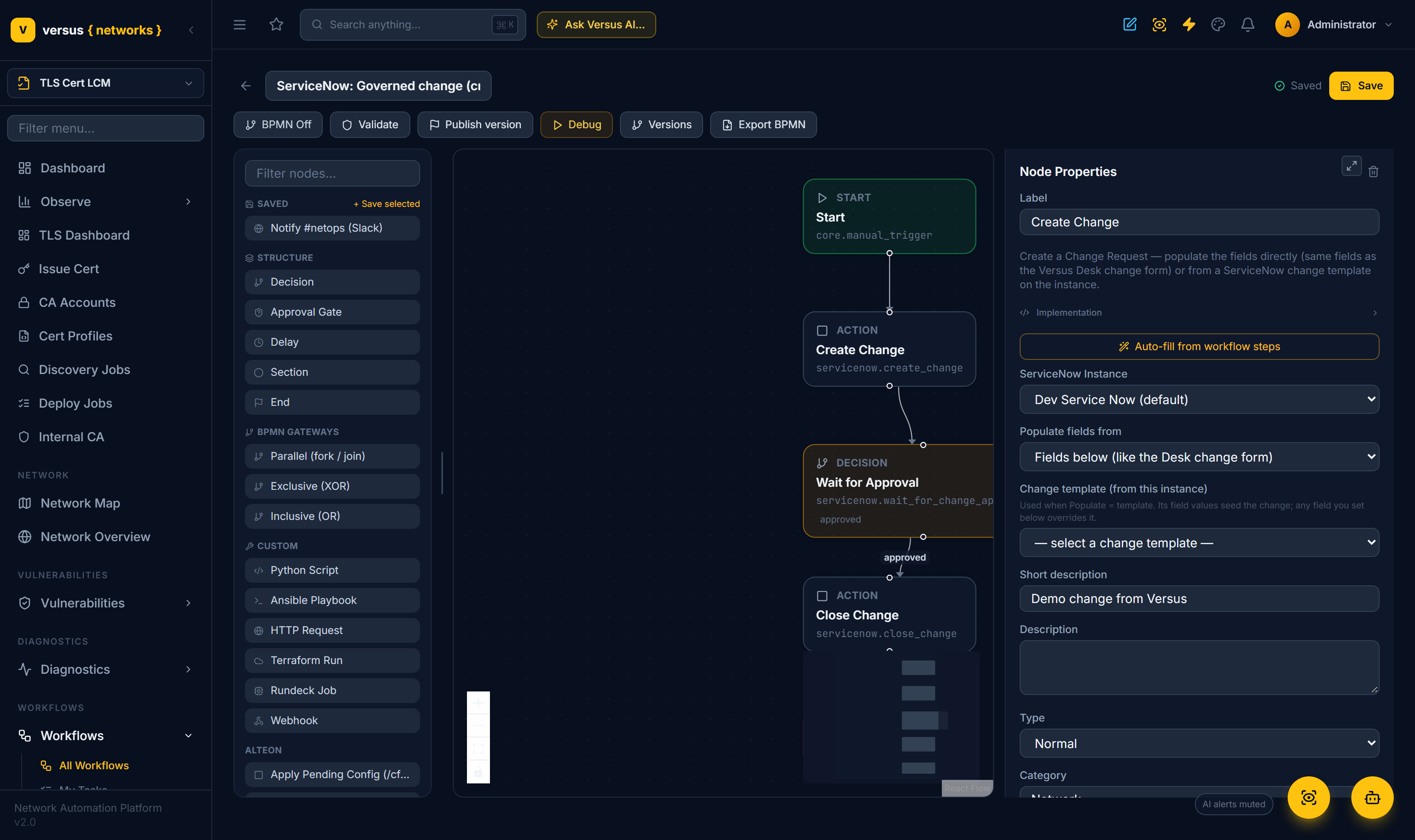
Every node's ServiceNow Instance field defaults to your configured instance. The Create Change node builds a change three ways: fill the full Desk field set (short description, category, risk, impact, priority, implementation / backout / test plans, risk & impact analysis, planned window, CAB, affected CIs), apply a ServiceNow change template picked live from the instance, or let Auto-fill from workflow steps populate it from the workflow.
Two-way sync
For any ticket correlated to ServiceNow, Versus Desk and ServiceNow stay in step: a work noteadded on either side appears on the other exactly once, and resolving in Desk resolves the ServiceNow record (and vice-versa). Loops are prevented by a sync-actor stamp, own-account filtering, and a per-ticket watermark; a per-type system of record decides who owns state for incidents versus changes. The sync runs quietly in the background — there is nothing to click — so a note your engineer types in Desk is on the ServiceNow incident seconds later, and a comment your ServiceNow user adds comes back into Desk.
Triggers & Event Management
Inbound — a ServiceNow business rule or Flow POSTs to /api/servicenow/{instance}/webhook/ and starts a mapped Versus workflow. The call is HMAC-signed and allow-listed (the shared secret and the set of workflows a rule may start are set on the instance); an unsigned or unknown call fails safe.
Outbound — the servicenow.send_event node pushes a Versus alert into ServiceNow Event Management (em_event) to correlate alongside the rest of your ITOM signal.
MCP-first routing
Each ITSM operation is MCP-first: it prefers a ServiceNow MCP tool when the instance links an MCP server, and falls back to the ServiceNow Table API otherwise — always guaranteed. Deep CMDB crawl, IRE write-back, Import Set and attachments stay Table-API by design. Link a ServiceNow MCP server from the instance's MCP Server panel and operations route MCP-first automatically.
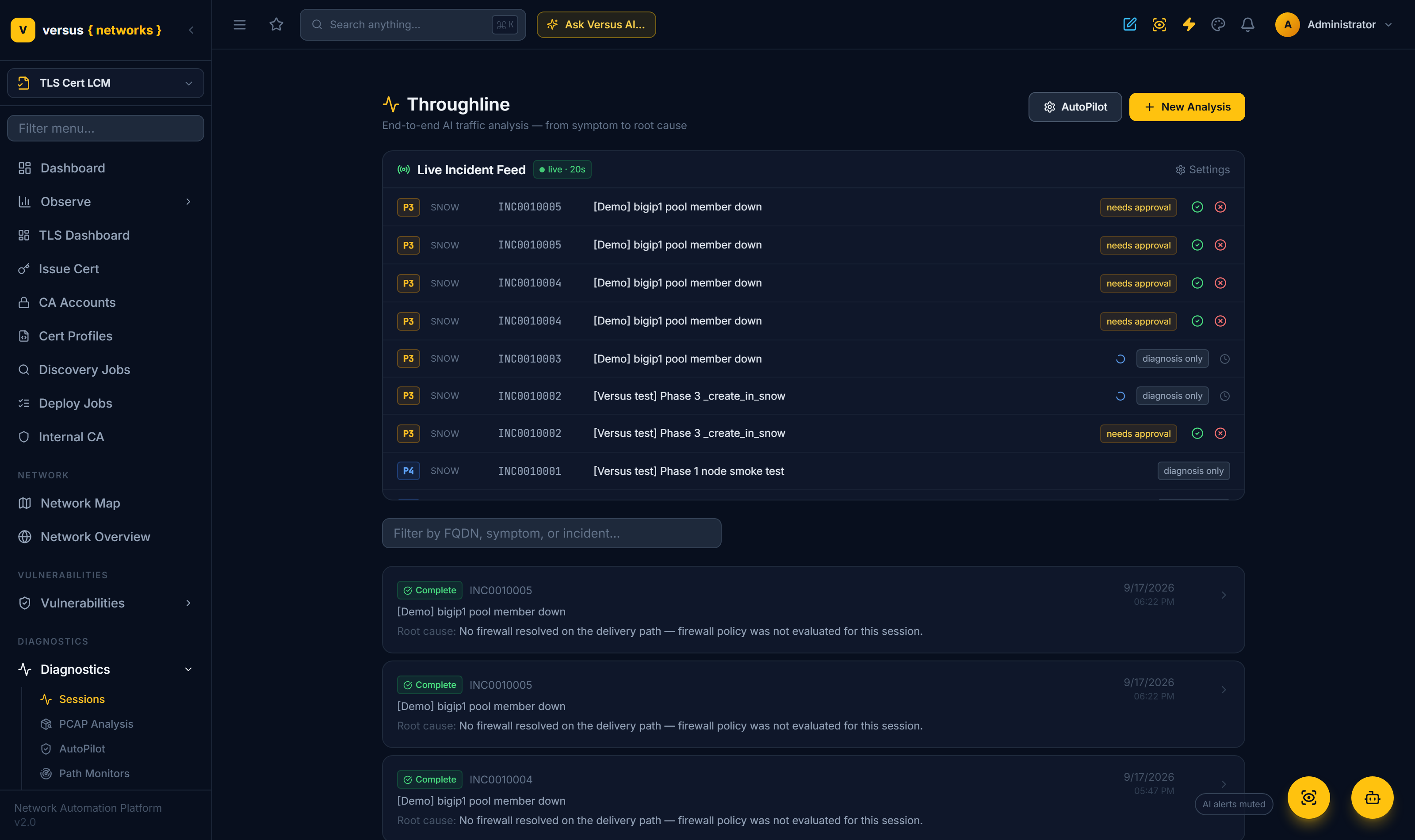
The Diagnostics AutoPilot feed polls two sources on a cadence — Versus Desk tickets and the ServiceNow incident table. Every new incident (deduped) opens an Analysis Session and launches the governed incident-response orchestrator — triage → diagnosis → tolerance-gated remediation — with priority mapped to P1 / P2 / P3 (P1 autonomous, P2/P3 approval-gated), and the diagnosis posted back as a work note on the originating incident.
So a ServiceNow incident becomes a proactive troubleshooting trigger: Versus starts investigating the moment the ticket lands. See Diagnostics AutoPilot for the full closed loop.
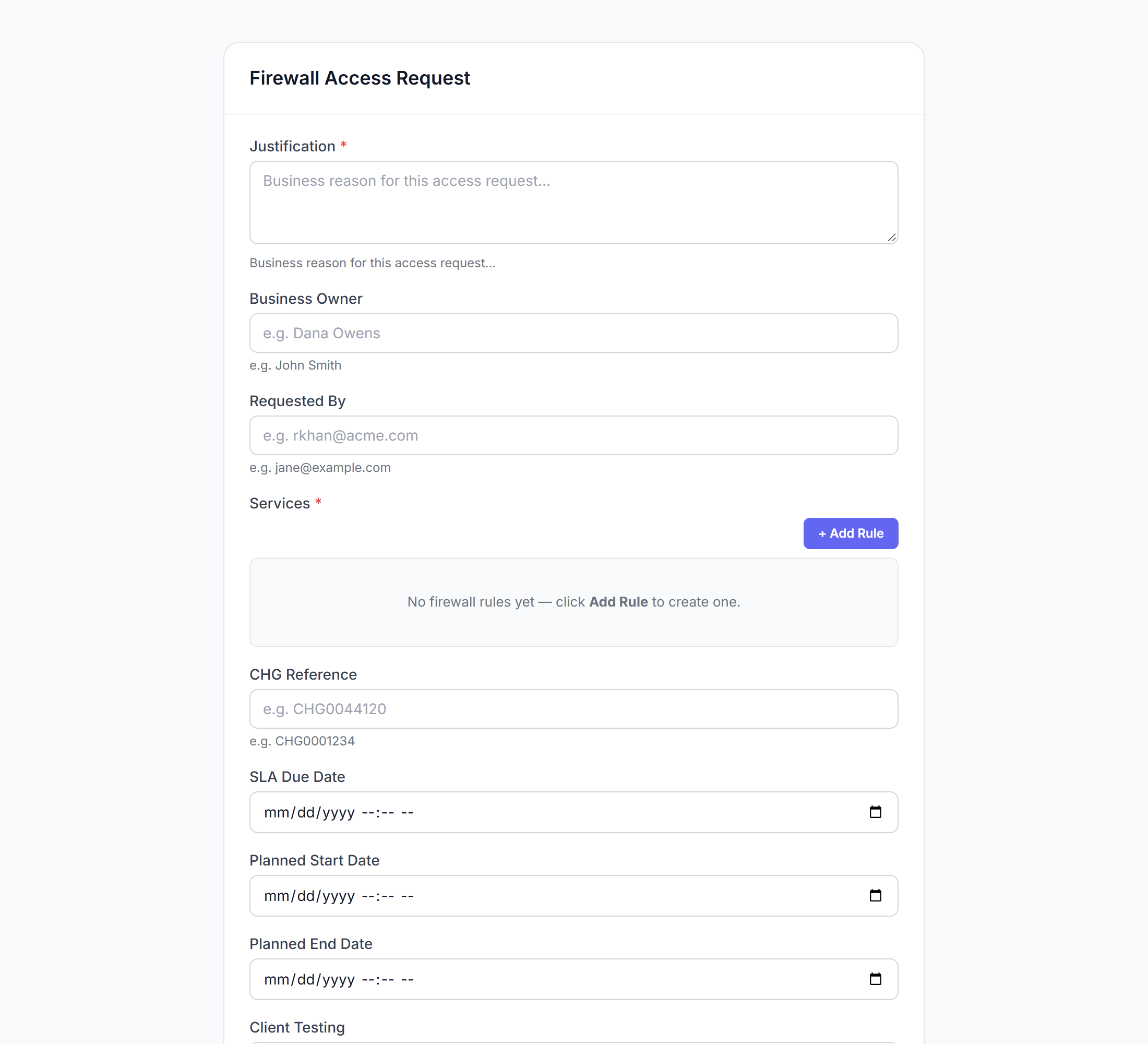
Build a service-catalog form in App Builder (drag-and-drop fields, validation, a workflow binding — no code), publish it, then embed it anywhere with a secure token — including as a ServiceNow Service Catalog item or portal widget. A user orders from ServiceNow; the embedded Versus form collects the request and a governed Versus workflow does the work.
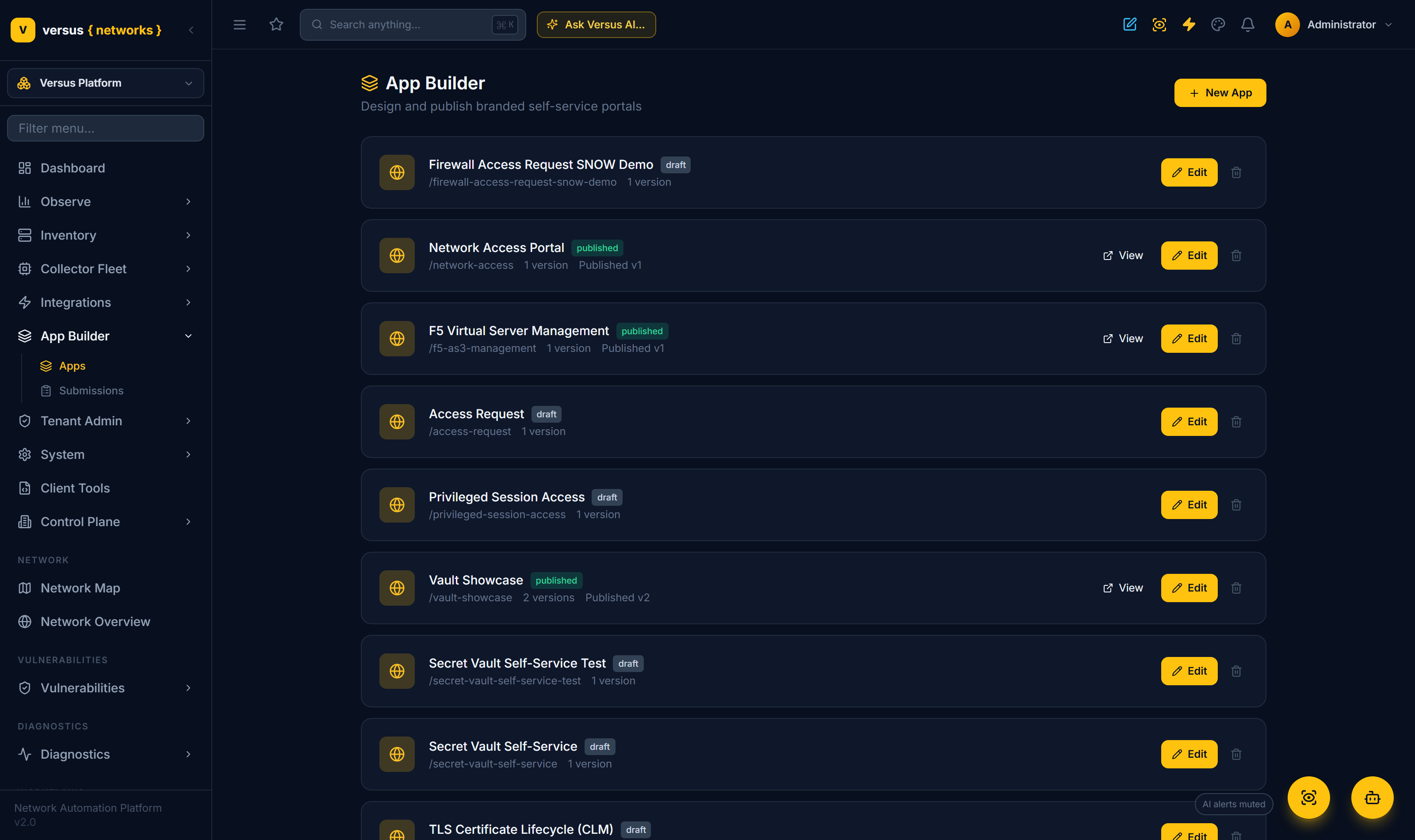
For example, the Network Access Portal app's Firewall Access Request form embeds via /embed/<token> and routes to a firewall-change workflow — the request is raised in ServiceNow, the change executed and audited by Versus.
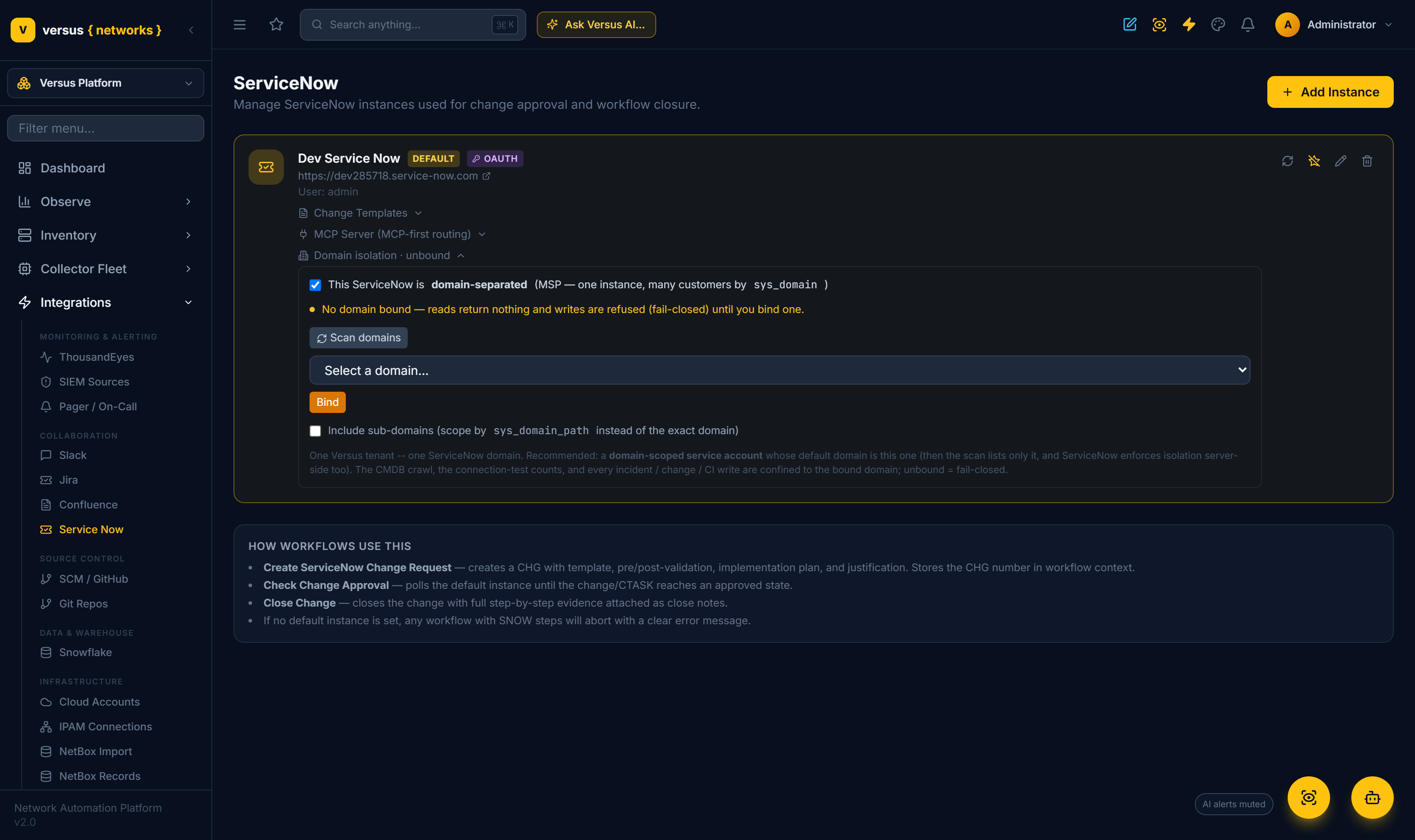
Many providers run one ServiceNow instance for many customers, partitioned by ServiceNow Domain Separation (sys_domain). Versus binds a connection to a single domain, so every operation — the CMDB crawl, the incident feed, the connection-test counts, and every incident / change / CI write — is confined to that domain. Expand Domain isolation on the instance, mark it domain-separated, Scan domains, and Bind the one this connection should use (the connecting account's own domain is detected and offered first).
- Reads are filtered to the bound domain (
sys_domain, orsys_domain_pathto include sub-domains). - Writes are stamped with the bound domain, so records land in the right customer's space and IRE never merges CIs across domains.
- Fail-closed: a domain-separated instance with no domain bound returns nothing and refuses writes — it never leaks into another domain or the global space.
Safe by design
- Fail-closed write-back — no CMDB change unless a flag and scope are explicitly set.
- Domain-isolated — on a domain-separated instance every read is filtered and every write stamped to the bound domain; unbound = fail-closed.
- Verified inbound triggers — HMAC-signed and allow-listed; unsigned calls rejected.
- Loop-safe sync — sync-actor and watermark guarantee each note syncs exactly once.
- Governed remediation — approvals and tolerance gates; every action audited and reversible.
- Graceful MCP fallback — operations never fail because MCP is unavailable.
Quick Reference
| Capability | Where |
|---|---|
| Connect + health test | Integrations → Service Now |
| CI Discovery (import / merge / enrich) | Inventory → CI Discovery |
| CMDB drift + remediation | Inventory → CMDB Drift |
| ServiceNow workflow nodes | Workflows → editor palette → ServiceNow |
| Inbound webhook | POST /api/servicenow/<instance>/webhook/ (HMAC-signed) |
| Outbound events | servicenow.send_event node → Event Management |
| MCP routing | Integrations → Service Now → MCP Server panel |
| Proactive troubleshooting | Diagnostics AutoPilot (ServiceNow incident feed) |
| Embedded forms | App Builder → publish → embed token → ServiceNow catalog |