Adopting Versus AI in the Enterprise
An architecture and governance guide for organizations introducing Versus AI agents — how AI calls leave your network, whether you need an LLM gateway, where the API key lives, how to project spend, and how MCP connects Versus to your future internal agents.
Many organizations meet Versus at the very start of their AI journey — Microsoft 365 Copilot was just rolled out to employees, and now a platform is asking for AI access for the first time. This guide is for the network, security, and platform teams who have to answer the resulting questions: what exactly calls an AI model, how do those calls leave the network, do we need a centralized LLM gateway first, and how does this relate to the agents we'll build ourselves later?
The short answers
| Question | Answer |
|---|---|
| Do we need a centralized LLM / agent gateway before using Versus? | No. One outbound HTTPS rule and a provider API key is a complete, production-grade day-one setup. |
| Can we just allow Versus to reach an AI provider over the Internet with a token key? | Yes. That is Pattern A below — a single TLS egress to the provider API, authenticated by a key you issue and can revoke. |
| If we do deploy an LLM gateway later, will Versus use it? | Yes, natively. Point the AI provider's base URL at any OpenAI-compatible gateway (LiteLLM, Azure API Management, Kong, Portkey, …). No feature changes, no redeployment. |
| Does our M365 Copilot licensing cover this? | No — and it doesn't need to. Employee Copilot and platform AI are separate planes. Versus brings its own provider relationship on your key; Copilot is unaffected either way. |
| Do our devices or engineers' laptops talk to the model? | Never. Only the Versus platform calls the provider. Devices keep their existing (often Internet-free) posture. |
| Can our future internal agents use Versus? | Yes, over MCP — Versus exposes a bearer-authenticated, read-only MCP server your agents can query, and can itself consume your internal MCP servers. No LLM keys are shared in either direction. |
What actually makes AI calls
Every AI feature in Versus — AutoPilot incident triage, syslog verdicts, the Ask assistant and Support Copilot, AI workflow generation, agent-supervised changes, vulnerability remediation planning — routes through one central LLM client in the platform. There is exactly one component in the whole architecture that speaks to an AI provider, and it is not your estate:
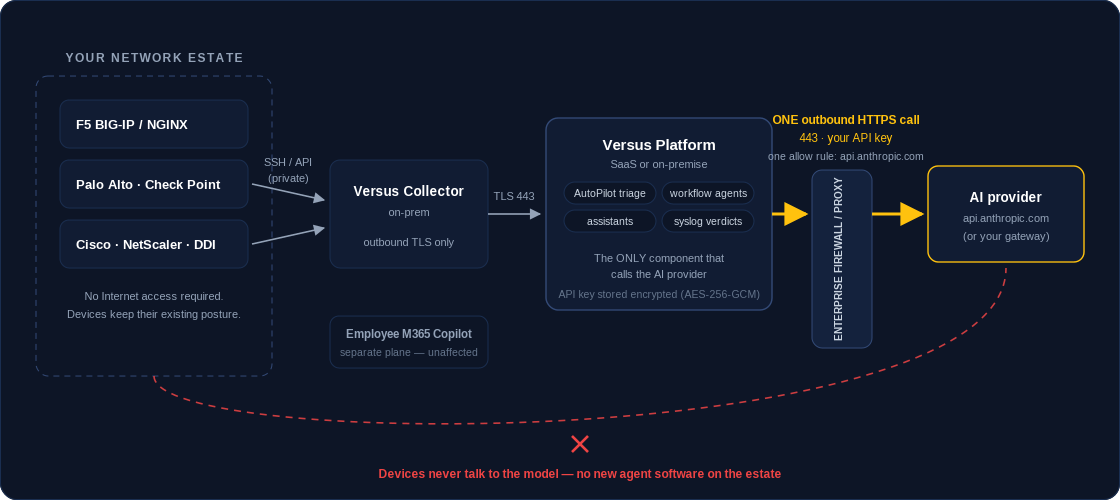
Three properties matter to a security review:
- Devices never see the model. Collectors reach devices over SSH/API on your private network and speak to the platform outbound-only. No agent software is added to network devices, and nothing on the estate needs Internet access.
- One egress, one identity. All AI traffic originates from the Versus platform (your on-premise install, or the SaaS tenant) toward a single provider endpoint, authenticated by an API key you issue, scope, and can revoke at the provider console in seconds.
- The key is custody-grade. The provider key is stored in the platform's encrypted secret store (AES-256-GCM envelope encryption), never in plaintext configuration, and never leaves the platform except inside the TLS session to the provider.
Two egress patterns — and how to choose
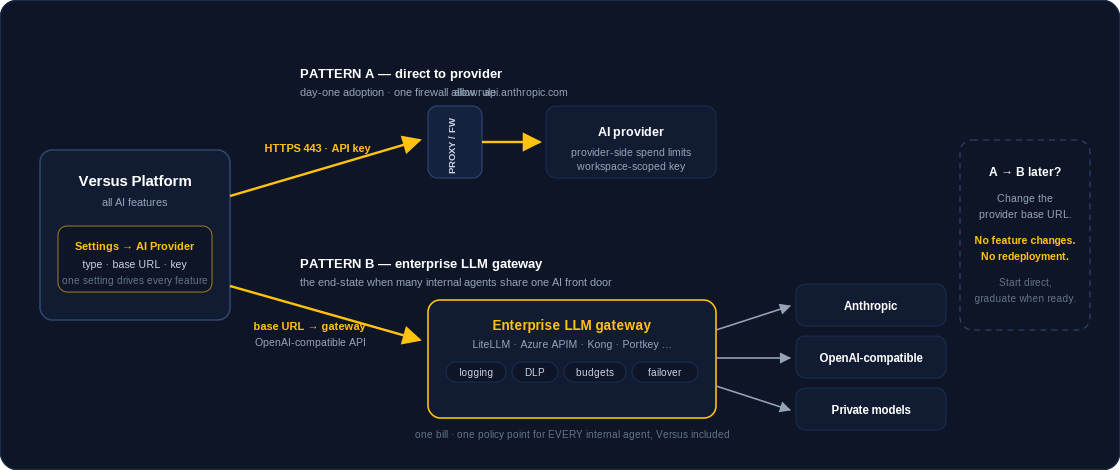
Pattern A — direct to provider (start here)
The provider is configured in Settings → AI Providers with a key from a dedicated,
workspace-scoped provider account. Your firewall or explicit proxy allows one destination
(api.anthropic.com:443, or your chosen provider's API host) from the Versus platform only.
Spend limits, usage analytics, and alerting live on the provider console. This is a complete
enterprise setup — most Versus customers run production on Pattern A.
On-premise installs that route Internet traffic through an explicit corporate proxy configure it
the way the rest of the platform already does (standard HTTPS_PROXY environment configuration);
the AI calls follow the same path as every other sanctioned outbound integration.
Pattern B — through an enterprise LLM gateway (the multi-agent end-state)
When several internal systems start calling models — Versus, your own agents, data teams — many enterprises centralize on an LLM gateway: one front door that adds unified logging, DLP inspection, per-team budgets, provider failover, and a single bill. Versus supports this natively: set the AI provider type to OpenAI-compatible and point its base URL at the gateway. Every AI feature follows, because they all share the one provider setting.
You do not have to choose up front. Start on Pattern A today; when the gateway program lands, moving Versus behind it is a configuration change — the base URL — with no feature work and no redeployment.
Network and key requirements at a glance
| Item | Requirement |
|---|---|
| Egress | Outbound TCP 443 (TLS) from the Versus platform to the provider API host — or to your gateway. Nothing else. |
| Inbound | None. AI features open no inbound ports and expose no new attack surface. |
| Key issuance | A dedicated API key from a provider workspace created for Versus — never a personal key. Set provider-side spend limits and alerts on that workspace. |
| Key custody | Pasted once into Settings → AI Providers; stored under envelope encryption; rotate by issuing a new key and updating the setting — no restart. |
| SaaS vs on-premise | Identical model. On-premise, you own both the key and the egress path end to end. |
| Web access by the model | One feature (vendor-advisory research) uses the provider's server-side web search, scoped to an allow-list of vendor documentation domains. No other feature browses. |
What data reaches the model
Prompts carry what the specific task needs: relevant configuration snippets, log lines, incident context, inventory metadata. Nothing streams continuously — a call happens when a feature runs. Three practical controls:
- Feature-level opt-in. AI features ship disabled or flag-gated and are enabled deliberately, one at a time — adopt at the pace your review allows.
- Provider data handling. Pair your key with the provider's enterprise terms (no training on API data; configurable retention). Under Pattern B, your gateway's DLP policy inspects every prompt centrally.
- An AI system register. Versus maintains one internally (part of its SOC 2 program) — a useful template demand for every AI system you onboard, not just this one.
Projecting volume and spend
AI usage scales with estate activity, not seat count. The AI cost calculator projects monthly tokens and cost from your device count, service requests, TLS certificates, and engineer count — including the model mix Versus uses (a light model for high-volume calls, a frontier model only for deep triage and agent supervision) and prompt caching. A 100-device estate typically lands in the tens of dollars per month. Cap the downside independently with provider-side budget alerts on the Versus workspace key.
How the agents themselves stay governed
Letting an agent read is one decision; letting it act is another. Versus separates them:
- Approval gates — agentic workflows pause at human approval steps before state-changing actions; autonomy level is per-workflow, not global.
- Designed back-outs — built-in upgrade workflows carry progress-aware back-out plans that revert only what actually ran.
- A full audit trail — every AI-initiated analysis, recommendation, and action is attributable and reviewable, with agent tasks behind an explicit platform flag and AI-generated schedules created disabled.
- Shadow-AI visibility — the platform's agent-identity security module inventories AI agents and their credentials, so the agents you didn't sanction become visible too.
MCP: where Versus meets your future agents
Adopting Versus does not create an AI silo. The platform speaks the Model Context Protocol in both directions:
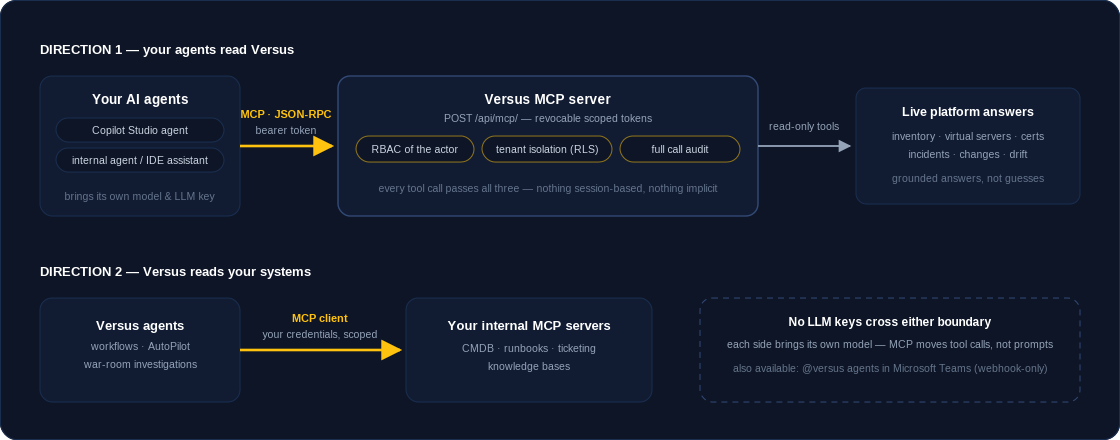
- Your agents read Versus. A Copilot Studio agent, an internal assistant, or an IDE agent calls the Versus MCP server with a revocable, scoped bearer token. Every tool call is bounded by the token actor's RBAC, isolated to its tenant at the database layer, and written to a call audit — so "ask the network platform" becomes a grounded, governed tool instead of a guess.
- Versus reads your systems. Versus agents can consume your internal MCP servers (CMDB, runbooks, ticketing) during investigations, using scoped credentials you grant.
- No model keys cross the boundary. MCP moves tool calls, not prompts — each side keeps its own provider relationship. Your employees can also meet the agents where they work, via the webhook-only @versus agents in Microsoft Teams.
A pragmatic rollout
First 30 days — issue a workspace-scoped provider key with a spend limit; add the single egress rule; enable read-only features (assistants, syslog verdicts, triage analysis); run the cost calculator against your real estate numbers.
Days 30–60 — review the audit trail and prompts with security; enable AI workflow generation and approval-gated agent actions on a bounded device group; set budget alerts from observed usage.
Days 60–90 — decide the gateway question from evidence (how many internal AI consumers actually exist?); if a gateway lands, repoint the base URL; issue MCP tokens to the first internal agent that would benefit from live network answers.
FAQ
Is this the same AI as our employees' Copilot? No. Employee Copilot is a per-user productivity license in the Microsoft cloud. Versus AI is platform-to-provider API traffic on a key you control. They never share credentials, data paths, or licensing.
Can we run it with no AI at all? Yes. Every AI feature degrades gracefully when no provider is configured — the platform's automation, workflows, and inventory work without a model. AI is an amplifier, not a dependency.
Which providers are supported? Anthropic natively (the default, and the models the product is tuned on), plus anything exposing an OpenAI-compatible API — which is how gateways, Azure-hosted models, and private model endpoints plug in.
Who sees our prompts? Only the configured provider (or your gateway, then the provider). Versus the company is not in the data path on an on-premise install, and SaaS tenants call the provider directly from the tenant's isolated backend.
What should we ask our provider for? A dedicated workspace for Versus, enterprise data-handling terms, spend limits with alerts, and usage analytics export — the same checklist you'll reuse for every future internal agent.